What are Tenant Merchants?
A Tenant Merchant represents one registered legal business inside your Tenant. It holds that business's official details, its card network identifiers, and the onboarding state of each payment service it uses.
If your organization includes several registered businesses, you can run all of them from one Tenant and one integration. Each business keeps the payment configuration that its own acquiring relationships require.
Why Use Tenant Merchants?
- Separate configuration for each business. Each Merchant has its own Account Updater and Network Tokens setup, so one business's acquiring relationships don't limit another's.
- One integration. Add a business without creating another Tenant, another set of API keys, or a separate integration.
- Data isolation. Resources can belong to a specific Merchant, and a request made on behalf of that Merchant only sees that business's data.
When Do You Need a Separate Merchant?
Create one Merchant per registered legal business: the entity responsible for selling goods or services and for the payments tied to those sales. Card networks verify that entity before they will return Account Updater results or issue Network Token credentials on its behalf, which is what makes the distinction matter.
A distinct official business registration ID is the strongest signal. Read it alongside the legal name, registration type, and issuing jurisdiction.
| Your situation | Separate Merchant? |
|---|---|
| Two businesses with distinct registration IDs | Yes. Each is responsible for its own sales and payments. |
| Different brands, websites, or stores under one registered business | No. Create one Merchant for the business and keep the brand mapping in your own system. |
| Separate trademark or DBA registrations | No. These are trading names, not legal entities. |
| A platform's sellers, stores, or customer accounts | Only where the seller is itself a registered business. Tenant Merchants are not a sub-merchant hierarchy, and they do not support payment-facilitator onboarding or settlement aggregation. |
| Businesses sharing a VAT or tax-group registration | Ask first. One number can cover several legal entities, and provider credentials cannot be shared across them by default. Contact us. |
| One registered business that wants separate rate limits | No. Contact us about capacity instead. |
Creating a Merchant stores business details. It does not register the business with a government authority or approve it with a card network. That happens during onboarding, which is requested per service and per network.
How Tenant Merchants Work
Each Tenant Merchant has its own settings, which override the Tenant-level defaults:
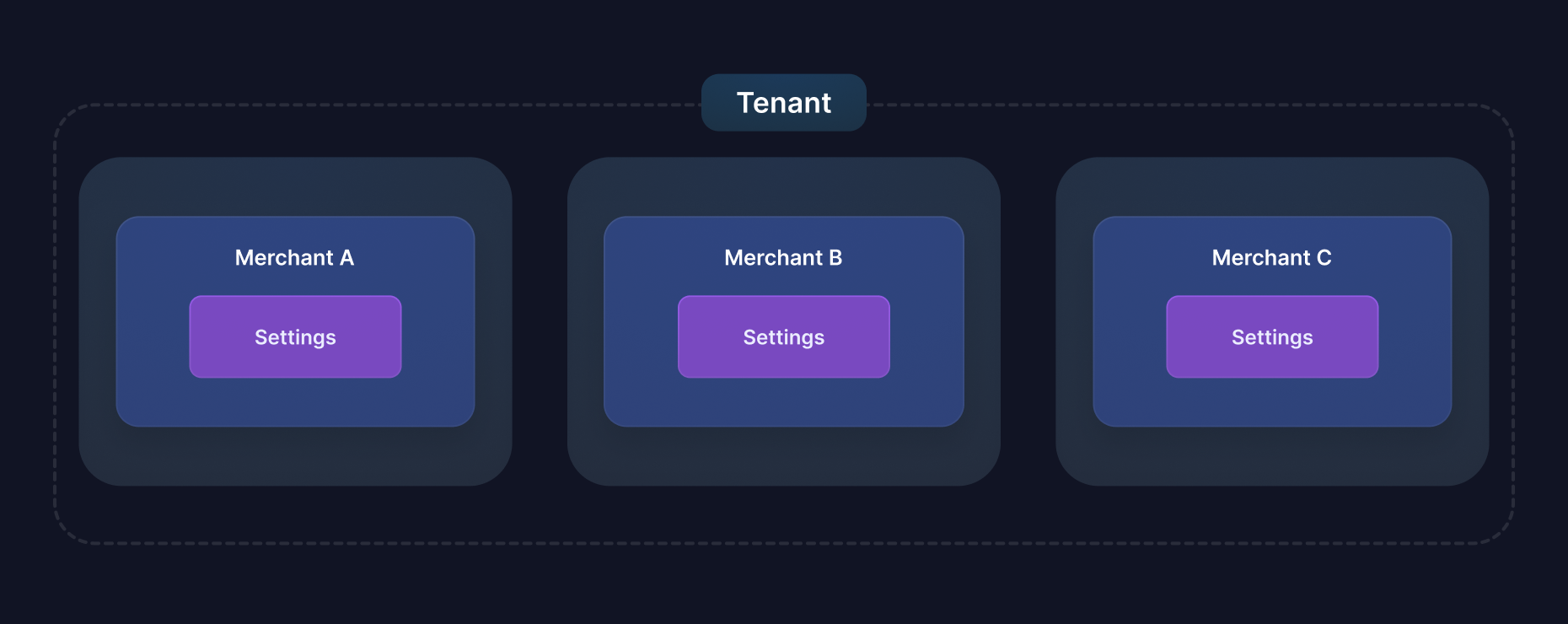
When you call Account Updater or Network Tokens, set configuration_merchant_id to choose which Merchant's configuration is used. To make the whole request on behalf of a Merchant, send the BT-MERCHANT-ID header instead.
Merchant Context: Acting as a Merchant
Beyond configuration, requests can act as a specific merchant by sending the BT-MERCHANT-ID header. The acting merchant drives resource ownership, access scoping, and merchant-level rate limiting, while two optional body properties allow ownership and configuration to be selected explicitly.
| Concern | Input | Meaning |
|---|---|---|
| Request context | BT-MERCHANT-ID header | The merchant the request is acting as. Scopes resource access, selects the merchant rate-limit bucket, and defaults ownership and configuration when their body properties are omitted. |
| Resource ownership | owner_merchant_id body property | Associates a newly created token or Network Token with a merchant. Defaults from the header. Network Tokens created from a merchant-owned source token inherit that token's owner when neither input is supplied; otherwise the resource remains unassociated. |
| Provider configuration | configuration_merchant_id body property | Selects the merchant whose Account Updater or Network Token configuration is used. Defaults from the header, then falls back to tenant-level configuration. |
| Legacy configuration selector | merchant_id body property (AU/NT) | Deprecated: use configuration_merchant_id instead. Selects configuration only; it never sets ownership or access scope. |
Precedence
- Resolved configuration merchant: explicit
configuration_merchant_id→ legacymerchant_id→BT-MERCHANT-IDheader → tenant-level configuration. - Resolved resource owner: explicit
owner_merchant_id→BT-MERCHANT-IDheader → source token's owner (Network Tokens created from a merchant-owned token) → no merchant association. When more than one of these is supplied they must name the same merchant. - Rate limiting and access scoping always follow the header; body properties never change the acting merchant.
Scoping Behavior
- Without the header, requests operate at the tenant level and can access every resource in the tenant, including merchant-owned ones.
- With the header, requests only see resources owned by that merchant. This includes not seeing unassociated resources: tokens created before you adopted the header are invisible to merchant-scoped requests (they remain fully accessible at the tenant level). There is no retroactive association, so send the header from day one on resources you want scoped.
- A
BT-MERCHANT-IDthat does not exist in your tenant responds404on any endpoint. - An
owner_merchant_idthat differs from the header merchant, or from a merchant-owned source token when creating a Network Token, is rejected with a validation error.
Sending the Header from SDKs
All server SDKs support per-request headers through their request options:
- Node
- Python
- Java
- Go
- C#
await client.tokens.create(
  { type: "card", data: cardData },
  { headers: { "BT-MERCHANT-ID": merchantId } }
);
client.tokens.create(
    type="card",
    data=card_data,
    request_options={"additional_headers": {"BT-MERCHANT-ID": merchant_id}},
)
client.tokens().create(request, IdempotentRequestOptions.builder()
    .addHeader("BT-MERCHANT-ID", merchantId)
    .build());
client.Tokens.Create(ctx, request,
    option.WithHTTPHeader(http.Header{"BT-MERCHANT-ID": []string{merchantID}}))
await client.Tokens.CreateAsync(request, new IdempotentRequestOptions
{
    AdditionalHeaders = new Dictionary<string, string?>
    {
        ["BT-MERCHANT-ID"] = merchantId
    }
});
Configuration vs. Ownership: Which Do You Need?
- Configuration only: if merchants exist purely to route Account Updater or Network Token requests to different provider configurations (for example, different acquiring relationships per business), use
configuration_merchant_idand skip the header. Resources stay tenant-level, with one exception: a Network Token created from a merchant-owned source token inherits that token's owner. - Ownership and isolation: if merchants are separate businesses whose resources must be queryable and isolated per merchant, send
BT-MERCHANT-IDon every request from the start. - The two can differ on the same request: the merchant whose provider configuration is used does not have to be the merchant that owns the resulting resource.
Common Use Cases
Multi-Entity Groups
A group with a separately incorporated subsidiary in each country it sells in has one legal business per country, each with its own registration, acquiring relationship, and compliance requirements. Each subsidiary is a Tenant Merchant, and the group runs all of them from one Tenant. If the group also runs several brands under a single registered entity, that entity is still one Merchant.
Platform Providers
Software platforms can onboard their clients individually when each client is a registered business in its own right, as independently incorporated clinics, restaurants, or agencies are. Each becomes a Tenant Merchant with its own Account Updater and Network Tokens configuration.
Being an account on a platform is not what qualifies a business; the legal registration is. Where a platform's sellers transact under the platform's own merchant identity, the platform is the Merchant and tracks its sellers on its own side.
Getting Started
You can create and onboard Tenant Merchants in the Basis Theory Portal. The Onboard a Merchant guide walks through registration, per-network status, and onboarding requests.
You can also manage Tenant Merchants with the Tenant Merchants API.