What are Reactors?
A Reactor is a serverless compute service allowing Node.js code hosted in Basis Theory to be executed against your tokens completely isolated away from your application and systems.
Reactors are invokable from any system that has the ability to make HTTPS requests and access the internet.
How It Works
Reactors are serverless function runtimes, similar to AWS Lambda, Azure Functions, or Cloudflare Workers - except your applications, systems, and infrastructure never touch the sensitive plaintext data.
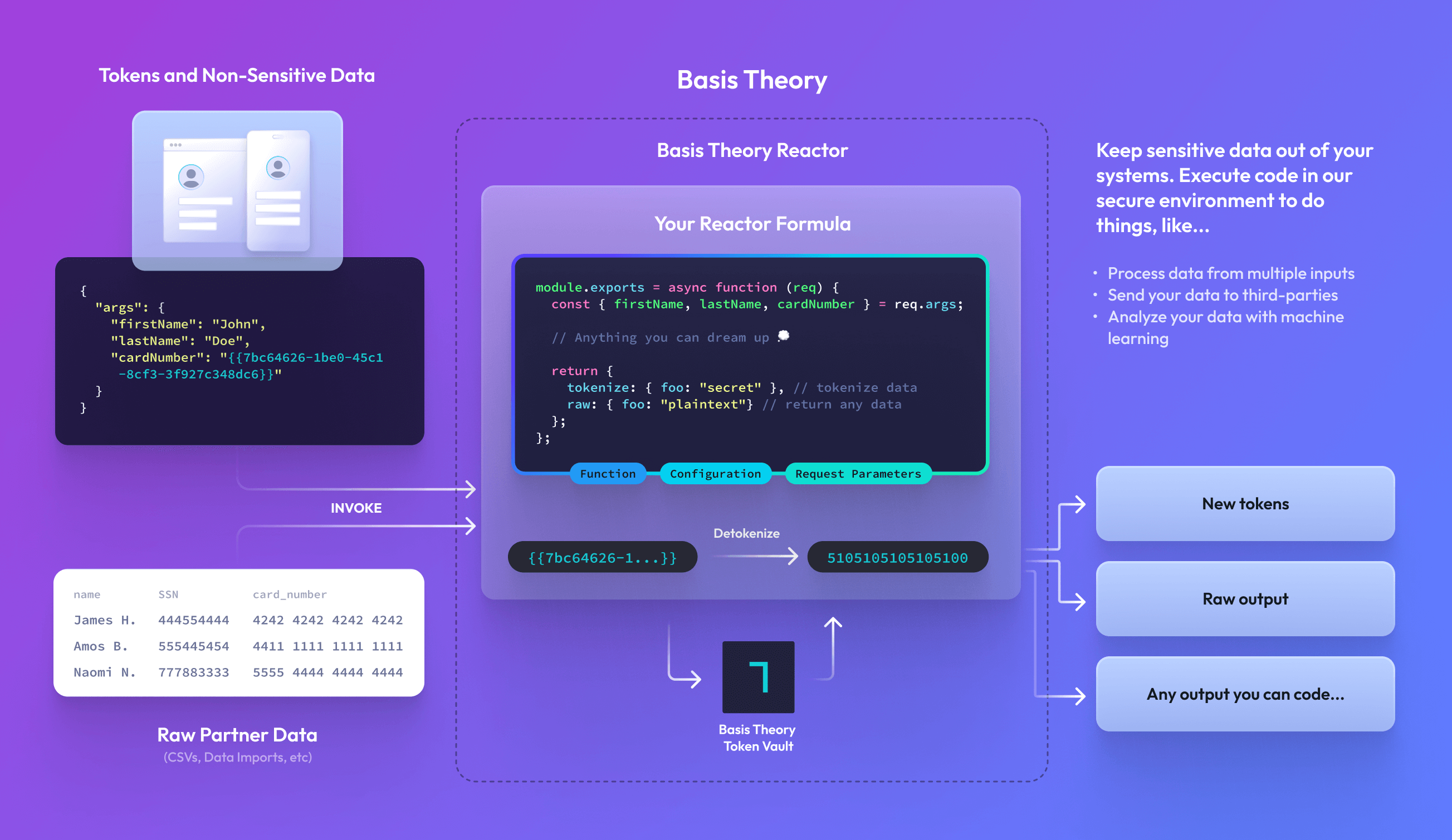
Runtimes
Reactors execute within a Runtime, a secure and isolated execution environment.
- Node.js Runtime Images: Supported images with custom npm packages, configurable resources, and runtime permissions.
- node-bt: Deprecated for new Reactor creation and retained for existing resources.
To update an existing legacy Reactor, follow Migrate from node-bt.
For deployment and continuous dependency scanning behavior, see Runtime Vulnerability Scanning.
node-bt runtime is deprecated. Use a Node.js runtime image for new Reactors and Proxy code transforms. Migrate away from the node-bt runtime as soon as possible to avoid disruption.Code Contract
Reactors use a function-based code contract that receives invocation arguments and returns a response. The contract structure differs between runtimes:
- node-bt (Deprecated)
- node22 / node24
module.exports = async function (req) {
  const { args, configuration, bt } = req;

  // Your code here

  return {
    tokenize: {
      sensitive_data: "will be tokenized"
    },
    raw: {
      non_sensitive: "returned in plaintext"
    }
  };
};
module.exports = async function (event) {
  const { req, configuration, logger } = event;

  logger.info("Processing request");

  // Your code here

  return {
    res: {
      body: {
        success: true,
        result: "processed"
      },
      headers: { "X-Custom-Header": "value" },
      statusCode: 200
    }
  };
};
Request Object
The reactor function receives a request object containing invocation arguments and configuration.
node-bt
| Attribute | Type | Description |
|---|---|---|
args | object | Arguments passed when invoking the reactor |
configuration | map<string, string> | Configuration values defined on the resource |
bt | object | Pre-configured Basis Theory SDK instance for token operations |
applicationOptions | object | Configuration information about the associated application |
applicationOptions.apiKey | string | The API key of the associated application. Useful for initializing your own SDK instance or HTTP client |
applicationOptions.baseUrl | string | The Basis Theory API URL for the application associated with the Reactor (e.g., https://api.basistheory.com). Useful to initialize @basis-theory/node-sdk or to make requests using an independent HTTP Client |
headers | object | Allowlisted Basis Theory headers from the invocation request: bt-merchant-id and bt-trace-id, each present only when received. No other inbound headers are exposed. See Forwarding BT-MERCHANT-ID |
Node.js Runtime Images
| Attribute | Type | Description |
|---|---|---|
req | object | Arguments passed when invoking the reactor |
configuration | map<string, string> | Configuration values defined on the resource |
logger | object | Logger instance with info(), warn(), error() methods |
asyncRecords | object | Available only during asynchronous invocation. Provides asyncRecords.write(recordId, value) for writing partial results. |
applicationOptions | object | Options available for calling the Basis Theory API from this runtime |
applicationOptions.apiKey | string | Scoped API key generated from runtime.permissions. This value is only available when runtime permissions are configured. Useful for initializing your own SDK instance or HTTP client |
applicationOptions.baseUrl | string | The Basis Theory API base URL (e.g., https://api.basistheory.com). Useful to initialize @basis-theory/node-sdk or to make requests using an independent HTTP Client |
headers | object | Allowlisted Basis Theory headers from the invocation request: bt-merchant-id and bt-trace-id, each present only when received. No other inbound headers are exposed. See Forwarding BT-MERCHANT-ID |
Response Object
The reactor function must return a response object.
node-bt
The response supports two different types, giving you the flexibility to either securely tokenize sensitive outputs or return raw outputs:
| Attribute | Type | Description |
|---|---|---|
tokenize | object | Any object passed will be tokenized |
raw | object | Any object passed will be returned in the response |
Node.js Runtime Images
The response is an object containing the HTTP response details:
| Attribute | Type | Default | Description |
|---|---|---|---|
res.body | object | {} | Response body returned |
res.headers | map<string, string> | {} | Custom headers to include in the response |
res.statusCode | number | 200 | HTTP status code |
For a synchronous invocation using a Node.js runtime image, this object determines the HTTP response returned by the /react endpoint. For an asynchronous invocation, the validated req or res object is returned under result when you retrieve the async result.
Creating a Reactor
Reactors are created with our Create Reactor endpoint. New examples use a Node.js runtime image. Once configured, a Reactor can be invoked to execute its code. Set runtime.async: true when creating an asynchronous Reactor.
- node-bt (Deprecated)
- node22 / node24
javascript='module.exports = async function (req) {
  // Do something with req.configuration.SERVICE_API_KEY

  return {
    raw: {
      foo: "bar"
    }
  };
};'

curl "https://api.basistheory.com/reactors" \
  -H "BT-API-KEY: <MANAGEMENT_API_KEY>" \
  -H "Content-Type: application/json" \
  -X "POST" \
  -d '{
    "name": "My First Reactor",
    "code": '"$(echo $javascript | jq -Rsa .)"',
    "configuration": {
      "SERVICE_API_KEY": "key_abcd1234"
    }
  }'
javascript='module.exports = async function (event) {
  const { configuration, logger } = event;

  logger.info("Processing request");
  // Do something with configuration.SERVICE_API_KEY

  return {
    res: {
      body: { foo: "bar" },
      statusCode: 200
    }
  };
};'

curl "https://api.basistheory.com/reactors" \
  -H "BT-API-KEY: <MANAGEMENT_API_KEY>" \
  -H "Content-Type: application/json" \
  -X "POST" \
  -d '{
    "name": "My First Reactor",
    "code": '"$(echo $javascript | jq -Rsa .)"',
    "configuration": {
      "SERVICE_API_KEY": "key_abcd1234"
    },
    "runtime": {
      "image": "node24"
    }
  }'
Credentials belong in configuration rather than in code. Reactor source is scanned for plaintext secrets on create, update, and patch, and writes that contain one are rejected. See Plaintext Secret Scanning for what is detected and how to check your source before you deploy it.
Invoking a Reactor
A Reactor's runtime configuration determines how it can be invoked. Synchronous Reactors use /react. Asynchronous Reactors use /react-async.
Reactors may be invoked by any private Application with reactor:invoke permission.
For node-bt reactors, the Application's token:use permission enables the Reactor to detokenize tokens provided in the request args. It is recommended that you restrict which tokens a Reactor can detokenize by only granting token:use permission on the most-specific container of tokens that is required.
For Reactors using a Node.js runtime image, use the permissions option to grant specific permissions directly to the Reactor.
Synchronous Reactors
Reactors are invoked synchronously by default. See Invoke Reactors for runtime-specific request bodies, SDK examples, responses, and limitations.
Asynchronous Reactors Enterprise
An asynchronous invocation submits work without waiting for the Reactor to finish. The response contains an asyncReactorRequestId; save it with the Reactor ID to retrieve the result later.
See the runtime-specific behavior for legacy node-bt or Node.js Runtime Images.
See Invoke Async Reactors for request bodies, SDK examples, polling, and result contracts.
Forwarding BT-MERCHANT-ID in Reactors and Proxy Transforms
When you invoke a Reactor with a BT-MERCHANT-ID header, the invocation acts as that tenant merchant: it is scoped to the merchant's resources and counts against the merchant's rate limits.
Your Reactor code can make additional Basis Theory API calls of its own, and each of those internal calls is a separate request. Basis Theory never auto-forwards BT-MERCHANT-ID or BT-TRACE-ID onto internal calls, consistent with BT-API-KEY, which is never forwarded. An internal call without the header runs at the tenant level: it counts against the tenant's rate limits rather than the merchant's, and it is not scoped to the merchant's resources. The same applies to Basis Theory API calls made from Proxy code transforms.
To keep internal calls attributed to the merchant, read the header from the request object and forward it explicitly on each call.
Reading the Inbound Headers
The runtime exposes two allowlisted headers from the invocation request on the headers property of the request object, keyed in lowercase:
| Key | Description |
|---|---|
bt-merchant-id | The tenant merchant the invocation is acting as. Present only when the caller sent BT-MERCHANT-ID |
bt-trace-id | The correlation ID of the invocation. Forward it to correlate logs between the invocation and your internal calls |
No other inbound headers are exposed to your code, and BT-API-KEY is never included.
Forwarding on Internal Calls
Forward the merchant ID by passing a BT-MERCHANT-ID header on each internal call. The @basis-theory/node-sdk accepts per-request headers through its request options:
- node-bt (Deprecated)
- node22 / node24
const { BasisTheoryClient } = require("@basis-theory/node-sdk-2");

module.exports = async function (req) {
  const { args, headers, applicationOptions } = req;

  const client = new BasisTheoryClient({
    apiKey: applicationOptions.apiKey,
    baseUrl: applicationOptions.baseUrl,
  });

  const token = await client.tokens.create(
    { type: "token", data: args.sensitive_value },
    { headers: { "BT-MERCHANT-ID": headers["bt-merchant-id"] } }
  );

  return {
    raw: { token_id: token.id }
  };
};
const { BasisTheoryClient } = require("@basis-theory/node-sdk");

module.exports = async function (event) {
  const { req, headers, applicationOptions, logger } = event;

  const client = new BasisTheoryClient({
    apiKey: applicationOptions.apiKey,
    baseUrl: applicationOptions.baseUrl,
  });

  logger.info("Creating token as the acting merchant");

  const token = await client.tokens.create(
    { type: "token", data: req.sensitive_value },
    { headers: { "BT-MERCHANT-ID": headers["bt-merchant-id"] } }
  );

  return {
    res: {
      body: { token_id: token.id },
      statusCode: 200
    }
  };
};
A header entry with an undefined value is not sent, so this pattern is safe when the Reactor is also invoked without a BT-MERCHANT-ID header: the internal call simply runs at the tenant level.
For forwarding inside Proxy code transforms, see Forwarding BT-MERCHANT-ID in Transforms.
Common Use Cases
Both runtimes support the same use cases with slightly different code structures. Below are examples showing how to implement common patterns in each runtime.
Call a 3rd Party
Depending on how complex your use case is a Reactor may provide you with an excellent opportunity to mutate data before forwarding it onto a 3rd Party. In the below example, we call httpbin.org (an echo service) with the last 4 characters of our token:
- node-bt (Deprecated)
- node22 / node24
const fetch = require("node-fetch");

module.exports = async function (req) {
  const { customer_id } = req.args;
  const last4 = customer_id.substring(-4);

  const response = await fetch("https://httpbin.org/post", {
    method: "POST",
    body: last4,
  });
  const raw = await response.json();

  return { raw };
};
module.exports = async function (event) {
  const { req, logger } = event;
  const { customer_id } = req;
  const last4 = customer_id.substring(-4);

  logger.info("Calling third party API");

  const response = await fetch("https://httpbin.org/post", {
    method: "POST",
    body: last4,
  });
  const body = await response.json();

  return {
    res: {
      body,
      statusCode: response.status
    }
  };
};
Create a PDF Document
Creating documents out of sensitive data is a primary need for businesses today, especially in fintech where you need to create and submit 1099s for many businesses:
- node-bt (Deprecated)
- node22 / node24
const fetch = require("node-fetch");
const PDFDocument = require("pdfkit");

module.exports = async function (req) {
  const { token: { data } } = req.args;

  let doc = new PDFDocument();
  doc.fontSize(8).text(`Some token data on a pdf: ${data}`, 1, 1);
  doc.end();

  const response = await fetch("https://httpbin.org/post", {
    method: "POST",
    body: doc,
  });
  const raw = await response.json();

  return { raw };
};
const PDFDocument = require("pdfkit");

module.exports = async function (event) {
  const { req, logger } = event;
  const { token: { data } } = req;

  logger.info("Generating PDF document");

  let doc = new PDFDocument();
  doc.fontSize(8).text(`Some token data on a pdf: ${data}`, 1, 1);
  doc.end();

  const response = await fetch("https://httpbin.org/post", {
    method: "POST",
    body: doc,
  });
  const body = await response.json();

  return {
    res: {
      body,
      headers: { "X-Document-Type": "pdf" },
      statusCode: 200
    }
  };
};
Generate a Text File and Send to an SFTP Server
Many legacy business processes still rely heavily on comma delimited files (CSV), tab delimited files or space-delimited files to transport data between companies, typically using SFTP servers as the endpoint of this data. For example, engaging with partner banks with ACH files requires you to format your file correctly and drop it on to an SFTP server.
- node-bt (Deprecated)
- node22 / node24
const { Client } = require('ssh2');

module.exports = async function (req) {
  const { HOST, USERNAME, PASSWORD } = req.configuration;
  const data = req.args;

  const conn = new Client();

  await new Promise((resolve, reject) => {
    conn
      .on('error', (error) => reject(error))
      .on('ready', () => {
        conn.sftp((err, sftp) => {
          const writeStream = sftp.createWriteStream('export.csv');

          writeStream.on('close', () => resolve());

          data.forEach((row) => {
            writeStream.write(row.join(','));
            writeStream.write('\n');
          });

          writeStream.end();
        });
      })
      .connect({
        host: HOST,
        port: 22,
        username: USERNAME,
        password: PASSWORD,
      });
  }).finally(() => conn.end());

  return {
    raw: { status: 'ok' }
  };
};
const { Client } = require('ssh2');

module.exports = async function (event) {
  const { req, configuration, logger } = event;
  const { HOST, USERNAME, PASSWORD } = configuration;
  const data = req;

  logger.info("Connecting to SFTP server");

  const conn = new Client();

  await new Promise((resolve, reject) => {
    conn
      .on('error', (error) => reject(error))
      .on('ready', () => {
        conn.sftp((err, sftp) => {
          const writeStream = sftp.createWriteStream('export.csv');

          writeStream.on('close', () => resolve());

          data.forEach((row) => {
            writeStream.write(row.join(','));
            writeStream.write('\n');
          });

          writeStream.end();
        });
      })
      .connect({
        host: HOST,
        port: 22,
        username: USERNAME,
        password: PASSWORD,
      });
  }).finally(() => conn.end());

  logger.info("File sent successfully");

  return {
    res: {
      body: { status: 'ok', file: 'export.csv' },
      statusCode: 201
    }
  };
};
Import File from a Partner
When you need to process files of sensitive data without it touching your systems, use a Reactor to desensitize a file before forwarding it on to your systems for your own logic:
- node-bt (Deprecated)
- node22 / node24
module.exports = async function (req) {
  const { bt, args } = req;
  const { fileString } = args; // "name,ssn\nTheory,555445555"

  const rows = fileString.split("\n").map((r) => r.split(","));

  await Promise.all(
    rows.slice(1).map((row) => {
      return bt.tokens
        .create({
          type: "social_security_number",
          data: row[1],
        })
        .then((token) => (row[1] = token.id));
    })
  );

  const desensitizedFile = rows.map((row) => row.join(",")).join("\n");

  return { raw: desensitizedFile };
};
const { BasisTheoryClient } = require("@basis-theory/node-sdk");

module.exports = async function (event) {
  const { req, applicationOptions, logger } = event;
  const { fileString } = req; // "name,ssn\nTheory,555445555"

  const client = new BasisTheoryClient({
    apiKey: applicationOptions.apiKey,
    baseUrl: applicationOptions.baseUrl,
  });

  logger.info("Processing file for tokenization");

  const rows = fileString.split("\n").map((r) => r.split(","));

  await Promise.all(
    rows.slice(1).map((row) => {
      return client.tokens
        .create({
          type: "social_security_number",
          data: row[1],
        })
        .then((token) => (row[1] = token.id));
    })
  );

  const desensitizedFile = rows.map((row) => row.join(",")).join("\n");

  logger.info("Tokenization complete");

  return {
    res: {
      body: desensitizedFile,
      headers: { "X-Tokens-Created": String(rows.length - 1) },
      statusCode: 201
    }
  };
};
For Node.js runtime images, add @basis-theory/node-sdk to your runtime.dependencies and include the token permissions your code needs in runtime.permissions. For example, include token:create when creating tokens.
Anything You Can Imagine
When our templates and examples aren't enough, we enable you to build anything you want to with our Reactors. Start with a blank function like the one below and solve any business problem with the data you need:
- node-bt (Deprecated)
- node22 / node24
module.exports = async function (req) {
  const { tokens } = req.args;

  // Anything you can dream up

  return {
    tokenize: { foo: "bar" }, // tokenize data
    raw: { foo: "bar" }, // return any data
  };
};
module.exports = async function (event) {
  const { req, logger } = event;

  // Anything you can dream up
  logger.info("Processing custom logic");

  return {
    res: {
      body: { foo: "bar" },
      statusCode: 200
    }
  };
};
FAQ
When do I use a Reactor?
When you need to write custom code to solve complex problems - for example when manipulating data, creating documents, calling third-party APIs with sensitive data, or importing files from partners.
When would I use the Proxy instead of a Reactor?
For simple HTTP requests, the Proxy provides a simpler implementation without needing to write custom code. The Proxy can detokenize and inject sensitive data into HTTP requests automatically.
Which runtime should I choose?
If you are:
- Starting a new project: Choose a Node.js runtime image for custom npm dependencies, configurable resources, and runtime permissions.
- Working with an existing
node-btReactor: Follow Migrate from node-bt. - Needing custom dependencies: Node.js runtime images allow any npm package.
See Node.js Runtime Images for the shared configuration and behavior.
What does the development lifecycle look like for building Reactors?
Each Reactor runs a single function which can be scoped, coded, and tested all within your normal development tooling and lifecycles. Code written and pushed to your own Github repositories can be used to create new Reactors using our Terraform Provider or API integrations.
Can I run reactor code locally to test?
Each function you write for your Reactors can be run and tested locally. This code can be treated exactly the same as the existing application code you're deploying to other infrastructure.
Can I keep my functions warm to reduce latency?
Most workloads don't need to. After an invocation, a Reactor instance typically stays warm for about 5 minutes, so steady traffic generally stays warm on its own. When you have a justified need, such as strict latency on sparse traffic, warm concurrency is the paid option: you can request warm instances through Settings > Quotas in the Portal. See Warm Concurrency for details.
Is there a concept of "sandbox" Reactors?
Reactors follow the same development lifecycle as the rest of the platform, allowing you to create a new Tenant to handle any testing from your staging or development environments.
What are the IP addresses for BT?
We have the list of our public IP addresses here.
How can Reactors reduce the PCI compliance scope of my application?
Using our Reactors allows you to execute code against any PCI classified data, enabling your infrastructure to stay out of PCI compliance.