Accept Apple Pay™
Decrypt and vault Apple Pay™ tokens to route one-time and recurring payments to any processor without touching raw card data.When a customer authorizes an Apple Pay™ payment, their device produces an encrypted payload containing a token and a one-time cryptogram. Basis Theory decrypts the payload, vaults the credentials, and gives you a token reference you can route to any processor via the Basis Theory Proxy.
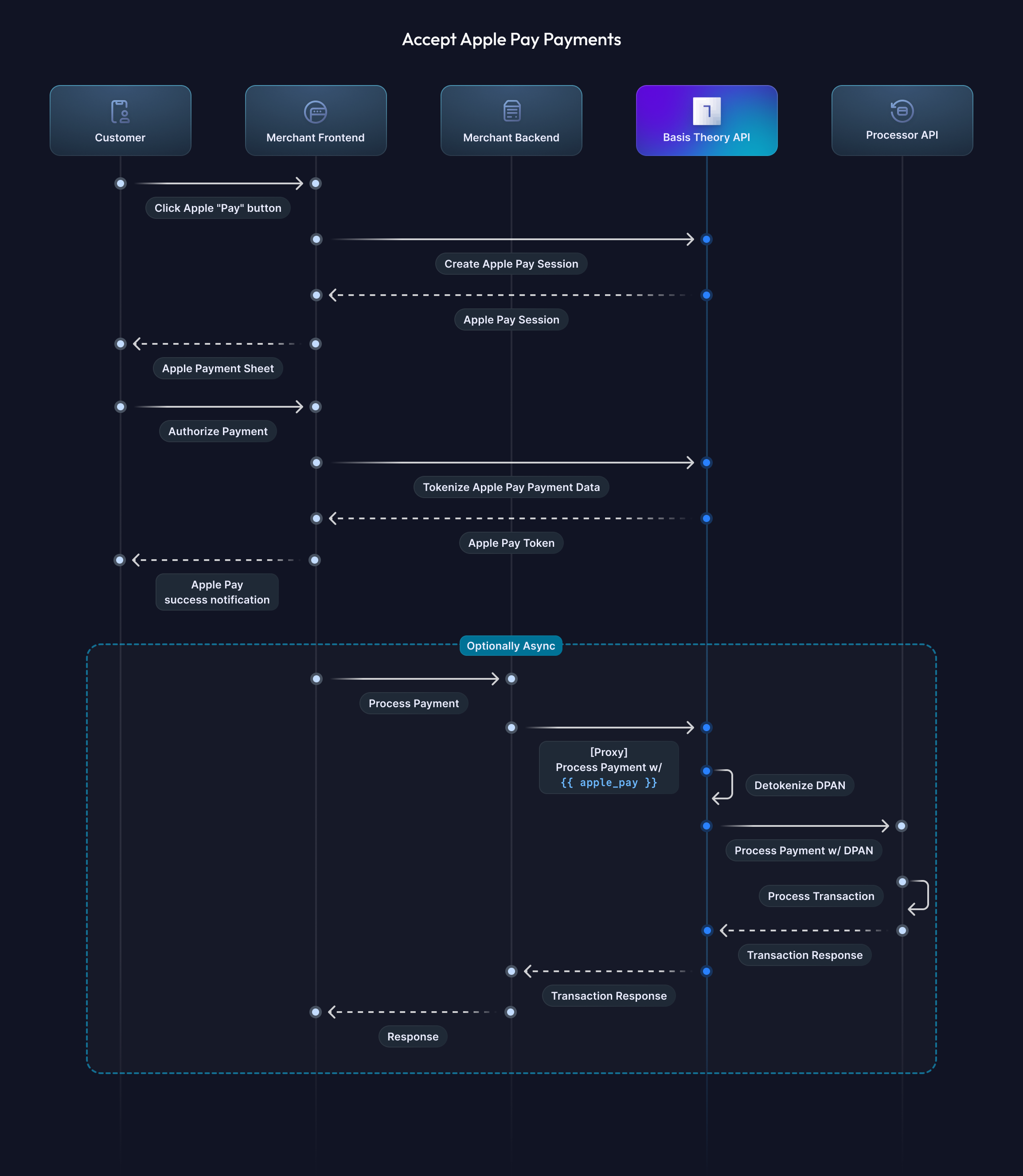
Token Types
Apple returns one of two token types depending on how you configure the payment request and whether the payment network supports it:
-
Device-specific payment token (DPAN) — a device-scoped token. The DPAN persists on the device and is reused across transactions, but each authorization generates a unique one-time cryptogram. This is the default token type. DPANs can be used for recurring payments, but because they are tied to a specific device, they can be deactivated if the customer switches devices or removes the card from their wallet.
-
Merchant token (MPAN) — a merchant-scoped token tied to a business and customer rather than a device. Apple recommends merchant tokens for recurring payment scenarios because they work across all of the customer's devices, enable recurring payments independent of a device, and remain active even when removed from a lost or stolen device.
Both token types follow the same implementation flow — the only difference is how you configure the payment request upfront. The tokenization response includes a type field (dpan or mpan) so your backend knows which was issued.
Requesting an MPAN
To receive an MPAN instead of a DPAN, your payment request must include one of Apple's recurring payment configurations. Apple's documentation covers the required fields and payment sheet behavior for each scenario:
- Recurring Payments (subscriptions, memberships): Web | iOS
- Automatic Reload (balance top-ups): Web | iOS
- Deferred Payments (pre-orders, delayed charges): Web | iOS
All three configurations share these fields:
managementURL(required) — a URL on your site where the customer can manage their recurring payment.tokenNotificationURL(optional but recommended) — the URL Apple calls when lifecycle events affect the merchant token, so Basis Theory can keep the token current. The URL depends on your setup:- Managed:
https://api.basistheory.com/apple-pay/<YOUR_TENANT_ID> - BYOK:
https://api.basistheory.com/apple-pay/<YOUR_TENANT_ID>/merchants/<YOUR_MERCHANT_REGISTRATION_ID>. BYOK merchant tokens are issued under your own Apple merchant identity, so the URL must carry yourmerchant_registration_id(from BYOK setup) for Basis Theory to fetch the events. If a BYOK token uses the managed URL, its events are dropped.
- Managed:
If the payment network does not support MPAN generation for the transaction, a DPAN is returned instead. Your backend should check the type field and handle both cases — the tokenization and payment processing flows are identical regardless of which type is issued.
Getting Started
To get started, you will need to create a Basis Theory Account and a TEST Tenant.
Public Application
You will need a Public Application to authenticate requests. Click here to create one using the Basis Theory Customer Portal.
This will create an application with the following Access Controls:
- Permissions:
apple-pay:session,apple-pay:create
key from the created Public Application as it will be used later in this guide.Private Application
You will need a Private Application to allow your backend to call Basis Theory APIs. Click here to create one using the Basis Theory Customer Portal.
This will create an application with the following Access Controls:
- Permissions:
proxy:invoke
key from the created Private Application as it will be used later in this guide.Create a Session (Web)
When the customer taps the Apple Pay button on your website, your page must initiate merchant validation before the payment sheet appears. Handle the onvalidatemerchant event by calling the Create Merchant Session endpoint.
<html>
<head>
  <script crossorigin src="https://applepay.cdn-apple.com/jsapi/1.latest/apple-pay-sdk.js"></script>
  <style>
    apple-pay-button {
      --apple-pay-button-width: 194px;
      --apple-pay-button-height: 64px;
      --apple-pay-button-border-radius: 13px;
      --apple-pay-button-padding: 0px 0px;
      --apple-pay-button-box-sizing: border-box;
    }
  </style>
  <script>
    function onApplePayButtonClicked() {
      if (!ApplePaySession) {
        return;
      }

      const session = new ApplePaySession(3, {
        countryCode: "US",
        currencyCode: "USD",
        merchantCapabilities: ["supports3DS", "supportsCredit", "supportsDebit"],
        supportedNetworks: ["visa", "masterCard", "amex", "discover"],
        total: {
          label: "My Store",
          type: "final",
          amount: "1.99"
        },
        // MPAN only: include one of the following to request a merchant token.
        // See "Requesting an MPAN" above for details. The tokenNotificationURL below is the
        // managed URL; BYOK integrations append /merchants/<YOUR_MERCHANT_REGISTRATION_ID>.
        // recurringPaymentRequest: {
        //   paymentDescription: "Monthly Premium Subscription",
        //   regularBilling: { label: "Monthly Premium", amount: "9.99", type: "final" },
        //   managementURL: "https://yoursite.com/manage-subscription",
        //   tokenNotificationURL: "https://api.basistheory.com/apple-pay/<YOUR_TENANT_ID>"
        // }
        // automaticReloadPaymentRequest: {
        //   paymentDescription: "Automatic Account Reload",
        //   automaticReloadBilling: { label: "Account Reload", amount: "25.00", type: "final" },
        //   managementURL: "https://yoursite.com/manage-auto-reload",
        //   tokenNotificationURL: "https://api.basistheory.com/apple-pay/<YOUR_TENANT_ID>"
        // }
        // deferredPaymentRequest: {
        //   paymentDescription: "Pre-order Payment",
        //   deferredBilling: { label: "Item Charge", amount: "149.99", type: "final" },
        //   managementURL: "https://yoursite.com/manage-preorders",
        //   tokenNotificationURL: "https://api.basistheory.com/apple-pay/<YOUR_TENANT_ID>"
        // }
      });

      session.onvalidatemerchant = async (event) => {
        const merchantSession = await createSession();
        session.completeMerchantValidation(merchantSession);
      };

      session.begin();
    }

    async function createSession() {
      const response = await fetch("https://api.basistheory.com/apple-pay/session", {
        method: "POST",
        headers: {
          "Content-Type": "application/json",
          "BT-API-KEY": "<PUBLIC_APPLICATION_KEY>"
        },
        body: JSON.stringify({
          display_name: "My Store",
          domain: window.location.host,
          // BYOK only: include the merchant_registration_id from Setup (BYOK) step 3
          // merchant_registration_id: "<MERCHANT_REGISTRATION_ID>"
        })
      });

      if (!response.ok) {
        throw new Error(`Session request failed: ${response.status}`);
      }

      return response.json();
    }
  </script>
</head>
<body>
  <apple-pay-button buttonstyle="black" type="plain" locale="en-US"></apple-pay-button>
  <script>
    document.querySelector("apple-pay-button")
      .addEventListener("click", onApplePayButtonClicked);
  </script>
</body>
</html>
This step is web-only. iOS apps using PassKit skip merchant validation entirely — Apple enforces the merchantIdentifier against your app's Merchant IDs Entitlement at payment sheet presentation, which removes the need for a server-side session handshake.
Tokenize
After the customer authorizes the payment, Apple passes the encrypted payment token to your handler. Send it to the Tokenize endpoint so Basis Theory can decrypt and vault the credentials.
- Web
- iOS
Add the onpaymentauthorized handler to the session you created in the previous step:
session.onpaymentauthorized = async (event) => {
  try {
    const applePayToken = await tokenize(event.payment.token);
    session.completePayment(ApplePaySession.STATUS_SUCCESS);
    // send applePayToken.id to your backend for processing
    await chargePayment(applePayToken.id);
  } catch (e) {
    console.error(e);
    session.completePayment(ApplePaySession.STATUS_FAILURE);
  }
};

async function tokenize(paymentToken) {
  const response = await fetch("https://api.basistheory.com/apple-pay", {
    method: "POST",
    headers: {
      "Content-Type": "application/json",
      "BT-API-KEY": "<PUBLIC_APPLICATION_KEY>"
    },
    body: JSON.stringify({
      apple_payment_data: {
        paymentData: paymentToken.paymentData,
        transactionIdentifier: paymentToken.transactionIdentifier,
      },
      // BYOK only: include the merchant_registration_id from Setup (BYOK) step 3
      // merchant_registration_id: "<MERCHANT_REGISTRATION_ID>"
    })
  });

  if (!response.ok) {
    throw new Error(`Tokenization failed: ${response.status}`);
  }

  const data = await response.json();
  return data.apple_pay;
}
Implement the paymentAuthorizationController(_:didAuthorizePayment:handler:) delegate method to receive the authorized payment and call the Tokenize endpoint:
import PassKit

func paymentAuthorizationController(
    _ controller: PKPaymentAuthorizationController,
    didAuthorizePayment payment: PKPayment,
    handler completion: @escaping (PKPaymentAuthorizationResult) -> Void
) {
    Task {
        do {
            let applePayToken = try await tokenize(payment.token)
            completion(PKPaymentAuthorizationResult(status: .success, errors: nil))
            // send applePayToken["id"] to your backend for processing
        } catch {
            completion(PKPaymentAuthorizationResult(status: .failure, errors: [error]))
        }
    }
}

func tokenize(_ paymentToken: PKPaymentToken) async throws -> [String: Any] {
    let paymentData = try JSONSerialization.jsonObject(with: paymentToken.paymentData)

    let body: [String: Any] = [
        "apple_payment_data": [
            "paymentData": paymentData,
            "transactionIdentifier": paymentToken.transactionIdentifier
        ],
        // BYOK only: include the merchant_registration_id from Setup (BYOK) step 3
        // "merchant_registration_id": "<MERCHANT_REGISTRATION_ID>"
    ]

    var request = URLRequest(url: URL(string: "https://api.basistheory.com/apple-pay")!)
    request.httpMethod = "POST"
    request.setValue("application/json", forHTTPHeaderField: "Content-Type")
    request.setValue("<PUBLIC_APPLICATION_KEY>", forHTTPHeaderField: "BT-API-KEY")
    request.httpBody = try JSONSerialization.data(withJSONObject: body)

    let (data, response) = try await URLSession.shared.data(for: request)
    guard let http = response as? HTTPURLResponse, http.statusCode == 200 else {
        throw URLError(.badServerResponse)
    }

    guard let json = try JSONSerialization.jsonObject(with: data) as? [String: Any],
          let applePayData = json["apple_pay"] as? [String: Any] else {
        throw NSError(domain: "TokenizationError", code: 0, userInfo: [NSLocalizedDescriptionKey: "Unexpected response shape"])
    }
    return applePayData
}
The response includes an apple_pay object. Save the id and pass it to your backend to process the payment. Decrypted card data is never returned to the client — it is only accessible server-side through proxy expressions when forwarding the payment to your processor.
{
  "apple_pay": {
    "id": "4bdbd69e-2678-4c1e-8650-26e3e6a98949",
    "type": "dpan",
    "authentication": {
      "eci_indicator": "07",
      "threeds_cryptogram": "AAAAAA..."
    }
  }
}
First Charge
The first transaction after tokenization is a customer-initiated transaction (CIT) that consumes the one-time cryptogram included with the DPAN or MPAN. Process this charge immediately — the cryptogram expires quickly, and if it expires before the first charge, subsequent merchant-initiated transactions linked to it will also fail.
From your backend, invoke an ephemeral Proxy to forward the decrypted credentials to your payment processor. The proxy resolves the Apple Pay token references in the request body before forwarding to the processor.
- Checkout.com
- Stripe
- Adyen
In Checkout.com, you can charge a card by calling the /payments API.
curl 'https://api.basistheory.com/proxy' \
  -X 'POST' \
  -H 'BT-API-KEY: <PRIVATE_API_KEY>' \
  -H 'BT-PROXY-URL: https://<CHECKOUT_PREFIX>.api.sandbox.checkout.com/payments' \
  -H 'Authorization: Bearer <CHECKOUT_AUTH_TOKEN>' \
  -H 'Content-Type: application/json' \
  --data '{
    "source": {
      "type": "network_token",
      "token_type": "applepay",
      "token": "{{ apple_pay: <APPLE_PAY_TOKEN_ID> | json: \"$.data.number\" }}",
      "expiry_month": "{{ apple_pay: <APPLE_PAY_TOKEN_ID> | json: \"$.data\" | card_exp: \"MM\" }}",
      "expiry_year": "{{ apple_pay: <APPLE_PAY_TOKEN_ID> | json: \"$.data\" | card_exp: \"YYYY\" }}",
      "eci": "{{ apple_pay: <APPLE_PAY_TOKEN_ID> | json: \"$.authentication.eci_indicator\" }}",
      "cryptogram": "{{ apple_pay: <APPLE_PAY_TOKEN_ID> | json: \"$.authentication.threeds_cryptogram\" }}"
    },
    "amount": 1000,
    "currency": "USD",
    "processing_channel_id": "<CHECKOUT_PROCESSING_CHANNEL_ID>"
  }'
{
  "id": "pay_myvj6zxrt45edgrswrliyxbtnq",
  "approved": true,
  "status": "Authorized",
  "amount": 1000,
  "currency": "USD",
  "source": {
    "type": "network_token",
    "id": "src_gguer4xlawke3ctljczft7573a",
    ...
  },
  "scheme_id": "647537243670773",
  ...
}
In Stripe, you can charge a card by creating a Payment Intent.
The electronic_commerce_indicator field must be omitted if eci_indicator is not present in the decrypted token. Call the Retrieve endpoint to check before sending.
curl 'https://api.basistheory.com/proxy' \
  -X 'POST' \
  -H 'BT-API-KEY: <PRIVATE_API_KEY>' \
  -H 'BT-PROXY-URL: https://api.stripe.com/v1/payment_intents' \
  -H 'Authorization: Bearer <STRIPE_SECRET_KEY>' \
  -H 'Content-Type: application/x-www-form-urlencoded' \
  --data-urlencode 'amount=1000' \
  --data-urlencode 'currency=usd' \
  --data-urlencode 'confirm=true' \
  --data-urlencode 'payment_method_data[type]=card' \
  --data-urlencode 'payment_method_data[card][network_token][tokenization_method]=apple_pay' \
  --data-urlencode 'payment_method_data[card][exp_month]={{ apple_pay: <APPLE_PAY_TOKEN_ID> | json: "$.data" | card_exp: "MM" }}' \
  --data-urlencode 'payment_method_data[card][exp_year]={{ apple_pay: <APPLE_PAY_TOKEN_ID> | json: "$.data" | card_exp: "YYYY" }}' \
  --data-urlencode 'payment_method_data[card][last4]={{ apple_pay: <APPLE_PAY_TOKEN_ID> | json: "$.data.number" | last4 }}' \
  --data-urlencode 'payment_method_data[card][network_token][number]={{ apple_pay: <APPLE_PAY_TOKEN_ID> | json: "$.data.number" }}' \
  --data-urlencode 'payment_method_data[card][network_token][exp_month]={{ apple_pay: <APPLE_PAY_TOKEN_ID> | json: "$.data" | card_exp: "MM" }}' \
  --data-urlencode 'payment_method_data[card][network_token][exp_year]={{ apple_pay: <APPLE_PAY_TOKEN_ID> | json: "$.data" | card_exp: "YYYY" }}' \
  --data-urlencode 'payment_method_options[card][network_token][cryptogram]={{ apple_pay: <APPLE_PAY_TOKEN_ID> | json: "$.authentication.threeds_cryptogram" }}' \
  --data-urlencode 'payment_method_options[card][network_token][electronic_commerce_indicator]={{ apple_pay: <APPLE_PAY_TOKEN_ID> | json: "$.authentication.eci_indicator" | pad_left: 2, "0" }}'
{
  "id": "pi_3MtwBwLkdIwHu7ix28a3tqPa",
  "status": "succeeded",
  "object": "payment_intent",
  "payment_method": "pm_1QaKJmG9VRQ2700S5JcsJv4Q",
  "latest_charge": {
    "payment_method_details": {
      "card": {
        "network_transaction_id": "8723dfab9c4e56a1b8cd0291ef67ac43"
        ...
      }
      ...
    }
    ...
  }
  ...
}
In Adyen, you can send decrypted Apple Pay tokens by calling the /payments API.
curl 'https://api.basistheory.com/proxy' \
  -X 'POST' \
  -H 'BT-API-KEY: <PRIVATE_API_KEY>' \
  -H 'BT-PROXY-URL: https://checkout-test.adyen.com/v71/payments' \
  -H 'X-API-Key: <ADYEN_API_KEY>' \
  -H 'Content-Type: application/json' \
  --data '{
    "amount": {
      "currency": "USD",
      "value": 1000
    },
    "reference": "<YOUR_ORDER_REFERENCE>",
    "merchantAccount": "<YOUR_MERCHANT_ACCOUNT>",
    "paymentMethod": {
      "type": "scheme",
      "brand": "applepay",
      "number": "{{ apple_pay: <APPLE_PAY_TOKEN_ID> | json: \"$.data.number\" }}",
      "expiryMonth": "{{ apple_pay: <APPLE_PAY_TOKEN_ID> | json: \"$.data\" | card_exp: \"MM\" }}",
      "expiryYear": "{{ apple_pay: <APPLE_PAY_TOKEN_ID> | json: \"$.data\" | card_exp: \"YY\" }}"
    },
    "mpiData": {
      "authenticationResponse": "Y",
      "directoryResponse": "Y",
      "cavv": "{{ apple_pay: <APPLE_PAY_TOKEN_ID> | json: \"$.authentication.threeds_cryptogram\" }}",
      "eci": "{{ apple_pay: <APPLE_PAY_TOKEN_ID> | json: \"$.authentication.eci_indicator\" }}"
    }
  }'
{
  "pspReference": "CNX333SGC7ZN6KV5",
  "merchantReference": "<YOUR_ORDER_REFERENCE>",
  "resultCode": "Authorised",
  "amount": {
    "currency": "USD",
    "value": 1000
  },
  "additionalData": {
    "networkTxReference": "377216678422238",
    "tokenization.storedPaymentMethodId": "NKLT7KJ7BVP5MNV5",
    ...
  },
  ...
}
Beware:
- Some payment processors require you to explicitly enable decrypted Apple Pay acceptance on your account before they will accept these payloads. Confirm with your processor before going live.
- You are not limited to the processors listed above. Any processor that accepts decrypted Apple Pay credentials can be reached through the ephemeral proxy.
- Store the network transaction ID: processors need this to link subsequent merchant-initiated transactions to the original CIT and achieve the best approval rates.
Subsequent Charges
Once the first charge has consumed the cryptogram, you can process merchant-initiated transactions (MITs) for recurring billing, subscriptions, or follow-up charges without the customer being present. These transactions reuse the Apple Pay token with the network transaction ID from the original CIT — no new cryptogram is needed.
- Checkout.com
- Stripe
- Adyen
In Checkout.com, you can charge a saved card by calling the /payments API. Pass the network transaction ID from the first charge into the previous_payment_id field.
curl 'https://api.basistheory.com/proxy' \
  -X 'POST' \
  -H 'BT-API-KEY: <PRIVATE_API_KEY>' \
  -H 'BT-PROXY-URL: https://<CHECKOUT_PREFIX>.api.sandbox.checkout.com/payments' \
  -H 'Authorization: Bearer <CHECKOUT_AUTH_TOKEN>' \
  -H 'Content-Type: application/json' \
  --data '{
    "source": {
      "type": "network_token",
      "token_type": "applepay",
      "token": "{{ apple_pay: <APPLE_PAY_TOKEN_ID> | json: \"$.data.number\" }}",
      "expiry_month": "{{ apple_pay: <APPLE_PAY_TOKEN_ID> | json: \"$.data\" | card_exp: \"MM\" }}",
      "expiry_year": "{{ apple_pay: <APPLE_PAY_TOKEN_ID> | json: \"$.data\" | card_exp: \"YYYY\" }}",
      "stored": true
    },
    "amount": 1000,
    "currency": "USD",
    "processing_channel_id": "<CHECKOUT_PROCESSING_CHANNEL_ID>",
    "previous_payment_id": "<NETWORK_TRANSACTION_ID>"
  }'
In Stripe, you can charge a saved card by creating a Payment Intent with off_session=true. Pass the network transaction ID from the first charge into the payment_method_options[card][mit_exemption][network_transaction_id] field.
curl 'https://api.basistheory.com/proxy' \
  -X 'POST' \
  -H 'BT-API-KEY: <PRIVATE_API_KEY>' \
  -H 'BT-PROXY-URL: https://api.stripe.com/v1/payment_intents' \
  -H 'Authorization: Bearer <STRIPE_SECRET_KEY>' \
  -H 'Content-Type: application/x-www-form-urlencoded' \
  --data-urlencode 'amount=1000' \
  --data-urlencode 'currency=usd' \
  --data-urlencode 'confirm=true' \
  --data-urlencode 'off_session=true' \
  --data-urlencode 'payment_method_data[type]=card' \
  --data-urlencode 'payment_method_data[card][network_token][tokenization_method]=apple_pay' \
  --data-urlencode 'payment_method_data[card][network_token][number]={{ apple_pay: <APPLE_PAY_TOKEN_ID> | json: "$.data.number" }}' \
  --data-urlencode 'payment_method_data[card][network_token][exp_month]={{ apple_pay: <APPLE_PAY_TOKEN_ID> | json: "$.data" | card_exp: "MM" }}' \
  --data-urlencode 'payment_method_data[card][network_token][exp_year]={{ apple_pay: <APPLE_PAY_TOKEN_ID> | json: "$.data" | card_exp: "YYYY" }}' \
  --data-urlencode 'payment_method_data[card][exp_month]={{ apple_pay: <APPLE_PAY_TOKEN_ID> | json: "$.data" | card_exp: "MM" }}' \
  --data-urlencode 'payment_method_data[card][exp_year]={{ apple_pay: <APPLE_PAY_TOKEN_ID> | json: "$.data" | card_exp: "YYYY" }}' \
  --data-urlencode 'payment_method_data[card][last4]={{ apple_pay: <APPLE_PAY_TOKEN_ID> | json: "$.data.number" | last4 }}' \
  --data-urlencode 'payment_method_options[card][mit_exemption][network_transaction_id]=<NETWORK_TRANSACTION_ID>'
In Adyen, you can charge a saved card by calling the /payments API. Pass the network transaction ID from the first charge into the additionalData.networkTxReference field and set shopperInteraction to ContAuth.
curl 'https://api.basistheory.com/proxy' \
  -X 'POST' \
  -H 'BT-API-KEY: <PRIVATE_API_KEY>' \
  -H 'BT-PROXY-URL: https://checkout-test.adyen.com/v71/payments' \
  -H 'X-API-Key: <ADYEN_API_KEY>' \
  -H 'Content-Type: application/json' \
  --data '{
    "amount": {
      "currency": "USD",
      "value": 1000
    },
    "reference": "<YOUR_ORDER_REFERENCE>",
    "merchantAccount": "<YOUR_MERCHANT_ACCOUNT>",
    "paymentMethod": {
      "type": "scheme",
      "brand": "applepay",
      "number": "{{ apple_pay: <APPLE_PAY_TOKEN_ID> | json: \"$.data.number\" }}",
      "expiryMonth": "{{ apple_pay: <APPLE_PAY_TOKEN_ID> | json: \"$.data\" | card_exp: \"MM\" }}",
      "expiryYear": "{{ apple_pay: <APPLE_PAY_TOKEN_ID> | json: \"$.data\" | card_exp: \"YY\" }}"
    },
    "additionalData": {
      "networkTxReference": "<NETWORK_TRANSACTION_ID>"
    },
    "shopperInteraction": "ContAuth",
    "recurringProcessingModel": "Subscription"
  }'
You are not limited to the processors listed above. Any processor that accepts decrypted Apple Pay credentials can be reached through the ephemeral proxy.
FAQ
How do I know whether a DPAN or MPAN was returned?
The tokenization response includes a type field on the apple_pay object with the value dpan or mpan. Your backend should read this field to determine how to route and store the token.
I requested an MPAN but received a DPAN.
MPAN generation depends on payment network support. If the payment network does not support MPAN for the transaction, Apple returns a DPAN instead. Apple also never issues MPANs in its sandbox environment, so sandbox test cards always return DPANs regardless of the payment request configuration. The tokenization and payment processing flows are identical regardless of which type is issued — check the type field and handle both cases.
What if the first charge fails?
The cryptogram is consumed on the first authorization attempt, whether it succeeds or fails. Any merchant-initiated transaction that relies on the network transaction ID from a failed CIT will also fail, because the network has no approved CIT to link against. The customer must re-authorize through the Apple Pay payment sheet to generate a new cryptogram before you can retry.
Do I need a separate integration for iOS and web?
The Basis Theory API calls for tokenization and payment processing are identical. The differences are in the front end: the web flow uses the Apple Pay JS API and requires a session creation step, while the iOS flow uses PassKit and skips session creation entirely. iOS integrations also always require Setup (BYOK) — Apple requires the merchant ID used by your app to be registered under your own Apple Developer account.
What happens in a Test tenant?
In a Test tenant, Basis Theory decrypts a real Apple Pay token from one of Apple's sandbox cards and returns the actual sandbox card data (DPAN, expiration, cryptogram, and ECI), so you can forward it to your processor's sandbox. Network tokens are still not issued in a Test tenant. For how this fits into validating the full payment chain before going live, see Platform Testing.
How does Basis Theory handle MPAN lifecycle updates?
When you set tokenNotificationURL to your Basis Theory endpoint, Apple sends lifecycle events (e.g., card updates, suspensions) directly to Basis Theory. Basis Theory processes these events and updates your MPAN tokens accordingly — no action is required on your side.
If you use BYOK, set a per-merchant endpoint instead: https://api.basistheory.com/apple-pay/<YOUR_TENANT_ID>/merchants/<YOUR_MERCHANT_REGISTRATION_ID>. Your merchant tokens are issued under your own Apple merchant identity, so Basis Theory needs your merchant_registration_id to process their events. See Requesting an MPAN for the full breakdown.
My Stripe PaymentIntent or SetupIntent fails when using Apple Pay.
For PaymentIntents, the currency in the Apple Pay session request and the currency in the PaymentIntent must match, or Stripe will decline the transaction. For SetupIntents, the session currency must match the default currency of your Stripe account — SetupIntents do not allow currency to be overridden.
Are the bin and last4 from the original card or the device token?
They come from the DPAN (the device token), not the original physical card (FPAN). Basis Theory only decrypts and vaults the DPAN and cryptogram — the FPAN is never sent to Basis Theory and is never stored.
Because DPANs are issued under network-reserved token BIN ranges, a DPAN's BIN and last4 are generally different from the underlying FPAN's. If you need the original card's details — for example, to match chargeback alerts from Verifi or Ethoca — exact FPAN matching is not possible from the tokenized data.
The Apple Pay PKPaymentToken exposes a plain paymentMethod.displayName (the card brand and the original card's last four, e.g. "Visa 1234"). Basis Theory does not process this field. If you need the original last four for display or matching, read displayName from the payment token on your front end before tokenizing.