Onboard a Merchant
Register a merchant and onboard it to Account Updater and Network Tokens from the Basis Theory Portal.Tenant admins use the Basis Theory Portal to register merchants and onboard them to Account Updater (AU) and Network Tokens (NT). This page describes the Merchants section of the Portal — what each page is for, what the data and statuses on each one mean, and which actions are gated by which conditions.
Overview
Tenant Merchants are logical boundaries inside a Tenant that hold independent configuration for payment services like Account Updater and Network Tokens. Before the card networks will issue AU updates or NT credentials on behalf of a merchant, that merchant must be registered with Basis Theory and onboarded to each network it will use.
You do both from the Portal. Creating a merchant registers the business details. Requesting onboarding submits per-network acquirer identifiers so each card network can authorize Basis Theory to act on the merchant's behalf.
Prerequisites
Managing merchants requires Account Updater or Network Tokens to be enabled on your tenant.
If neither service is enabled, request access at Settings → Quotas. Once at least one of AU or NT is enabled, the Merchants page becomes active and you can create merchants.
Test and Production Tenants
The Portal flow is the same in both test and production tenants, but what happens behind the scenes differs:
- In a TEST tenant, onboarding requests are routed to the AU and NT sandboxes. The sandboxes return stubbed responses and do not forward anything to the card networks, so you can exercise the full Portal flow without real acquirer identifiers. See Account Updater Testing and Network Tokens Testing for details.
- In a PRODUCTION tenant, onboarding requests are submitted to the actual card networks. The business details and per-network identifiers you provide must match the records your acquirer has on file, or the network will reject the submission.
The rest of this guide describes the information you need to collect for production onboarding. If you are only exercising the flow in a test tenant, you can skip ahead to Register a Merchant.
The sandboxes here cover the Basis Theory leg only. For how to validate the full chain across Basis Theory, your PSP, and the card networks before going live, see Platform Testing.
Information to Gather Before You Start
Collect the following before creating a merchant. The Portal's Create Merchant form asks for all of the business information below, and the Request Onboarding page asks for the per-network identifiers for every card network you onboard.
Business Information
| Field | Description |
|---|---|
| Full Legal Name | The complete legal name of the business as registered with the relevant government or regulatory authority. This must exactly match official registration records. |
| Doing Business As (DBA) | The trading name or brand name under which the business operates, if different from the legal name. This name may appear in customer-facing contexts. |
| Parent Company Name | The name of the parent company that owns or controls the merchant business, if applicable. Can be the same as the merchant name if there is no separate parent entity. |
| Website URL | The primary website or domain associated with the business (e.g., https://www.example.com). Should represent the merchant's official online presence. |
| Business Street Address | The registered street address of the business headquarters or principal place of operation. |
| Business City | The city associated with the registered business address. |
| Business Country | The country where the business is legally registered and operates. |
| Business Postal Code | The postal or ZIP code associated with the registered business address. |
| Business Registration ID | The official business registration number issued by the applicable government authority. Submitted as registration_id on the Tenant Merchants API. If the business is VAT-registered, provide the VAT number here with a registration type of VAT. |
| Business Registration Type | The type of registration identifier being provided (e.g., EIN, VAT, CNPJ). Submitted as registration_type on the Tenant Merchants API. See the accepted values below. |
| Business MCC | The four-digit Merchant Category Code (MCC) assigned by the acquirer or card networks that classifies the merchant's primary business activity (e.g., 5812 for restaurants). |
| Merchant Descriptor(s) | The business name or description that appears on the customer's credit card or bank statement after a transaction. Should be clear and recognizable. |
The Business Registration Type must be one of: ABN, ACN, BID, BIN, BIR, BN, BRN, BRNO, CF, CIF, CL, CLN, CNPJ, CORPORATE_NUMBER, CR, CRN, CUIT, CVR, DIC, EDRPOU, EIN, GST, HKBR, ICO, KRS, KvK, NATIONAL_ID, NIB, NID, NIF, NIP, NZBN, PAN, PLC, RC, REGON, RFC, RNC, ROC, RUC, RUT, SIN, SIREN, SIRET, SSN, TC, UEN, USCI, VAT.
There is no separate VAT field. A VAT number is submitted once, as the Business Registration ID with a registration type of VAT, and is validated against the VAT number format of the business country.
Per-Network Identifiers
These identifiers are typically obtained from your acquirer or directly from the card network. You provide them on the Request Onboarding page, per service and per network.
| Service | Network | Required Fields | Description |
|---|---|---|---|
| Account Updater | Visa | Acquirer BIN, Card Acceptor ID (CAID) | The Acquirer BIN is a 6-8 digit number (typically beginning with 4) assigned to your acquirer. The CAID identifies the specific merchant location or terminal accepting cards. |
| Account Updater | Mastercard | Merchant ID (MID) | A unique identifier assigned by your acquirer to the merchant for Mastercard transactions. Often matches the Card Acceptor ID. |
| Account Updater | Amex | SE Number | The Establishment (SE) Number assigned by American Express to the merchant in a Direct relationship. |
| Account Updater | Discover | Merchant ID (MID) | The unique identifier assigned by Discover to the merchant, required for receiving account updates from Discover. |
| Network Tokens | Visa | — | No additional identifiers required beyond the business information above. |
| Network Tokens | Mastercard | — | No additional identifiers required beyond the business information above. |
| Network Tokens | Amex | SE Number | The Direct SE Number assigned by American Express. Network Tokens on Amex is limited to merchants on a Direct SE relationship. |
| Network Tokens | Discover | Merchant ID (MID) | The Merchant ID or Establishment Number assigned by Discover, required to provision and manage Discover Network Tokens. |
These details are required by the card networks (Visa, Mastercard, Amex, Discover) to onboard merchants to Account Updater and Network Tokens. Basis Theory handles them securely and uses them only for that purpose. Acquirers will not incur any charges, because the card networks issue credentials directly to Basis Theory to enable access to AU and NT functionality.
The Merchants Page
The Merchants page is the entry point to merchant management in your tenant. It lists every merchant in the tenant and shows the onboarding status of Account Updater and Network Tokens. Tenant admins use this page to register new merchants, edit business details where allowed, and drill into a merchant to inspect its onboarding state.
Register a Merchant
Registration creates a Tenant Merchant inside your tenant and stores its business details. It does not onboard any service and does not contact any card network — AU and NT onboarding are requested separately, after the merchant exists, from its detail page.
The Create Merchant form on the Merchants page captures every field listed in Business Information. For production tenants, every value must match the records your acquirer holds for that merchant; mismatches surface later as rejections when the card networks evaluate the onboarding submission.
Edit Business Details
A merchant's business details are editable from the Merchants list while both AU and NT are in inactive or failed status. As soon as either service moves into onboarding or active, editing is locked.
This rule keeps the business details shown in the Portal in sync with what has already been submitted to a card network — silent edits to a live merchant would create drift between the Portal and the network's records. To change business details after a service has gone live, contact us.
The Merchant Detail Page
Each merchant has a detail page that surfaces everything Basis Theory knows about it: its business details and the onboarding state of every service and every card network underneath each service.
The Services & Onboarding Status card lists Account Updater and Network Tokens, each with a service-level status badge and a table of the card networks configured under it. Each network row shows its current status and the configuration values Basis Theory submitted on the merchant's behalf.
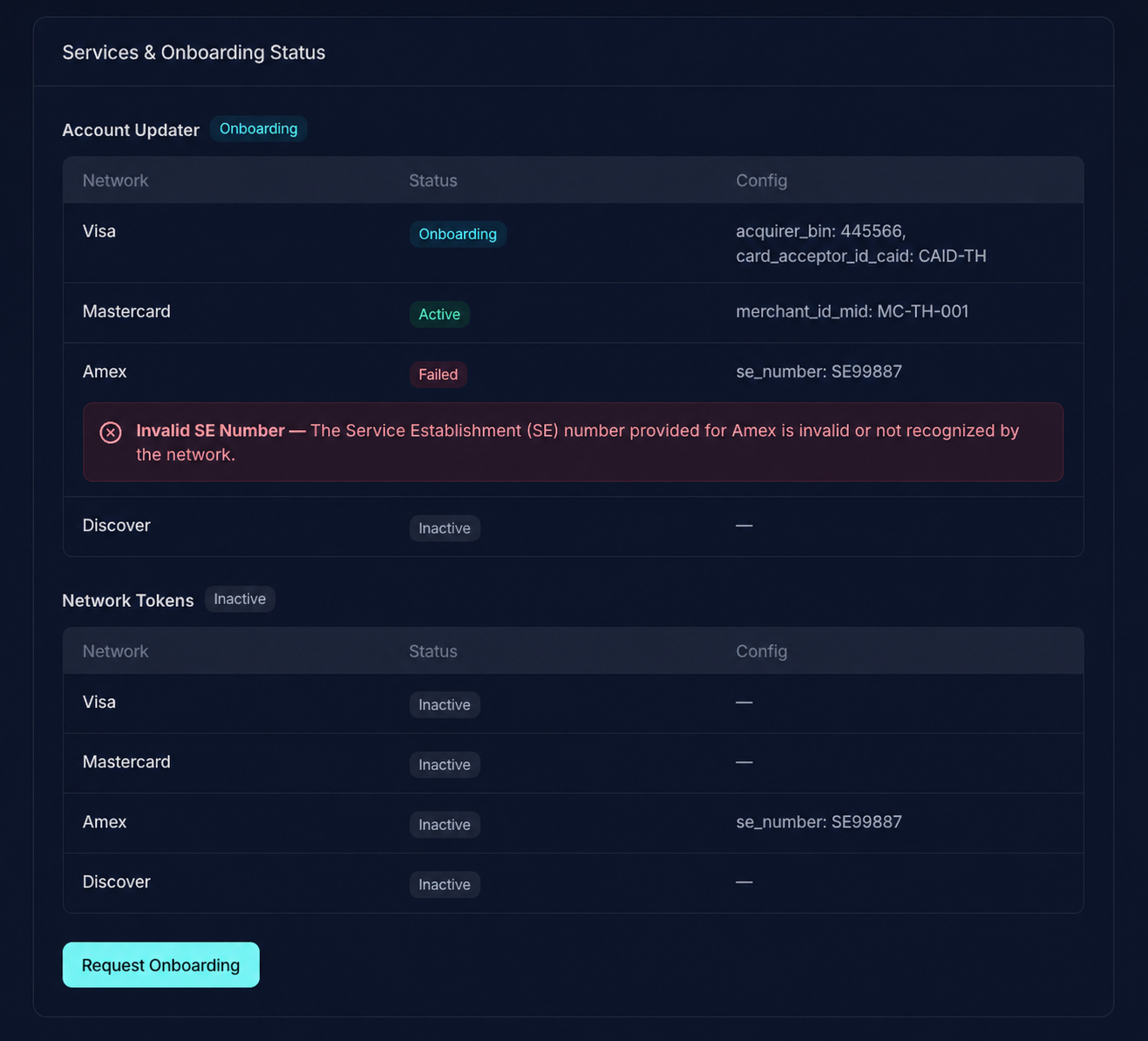
For any network in failed status, a callout below the row names the value that caused the rejection, for example:
Invalid Configuration — Acquirer BIN not registered with Visa.
This callout is the starting point for fixing a failed network — it identifies which configuration value to correct before re-requesting onboarding. See the Status Glossary for the meaning of each status.
Request Onboarding
Onboarding to AU and NT is submitted per merchant, per service, and per card network. The Request Onboarding page on the merchant detail page is where the acquirer-issued identifiers are collected and forwarded to each selected network.
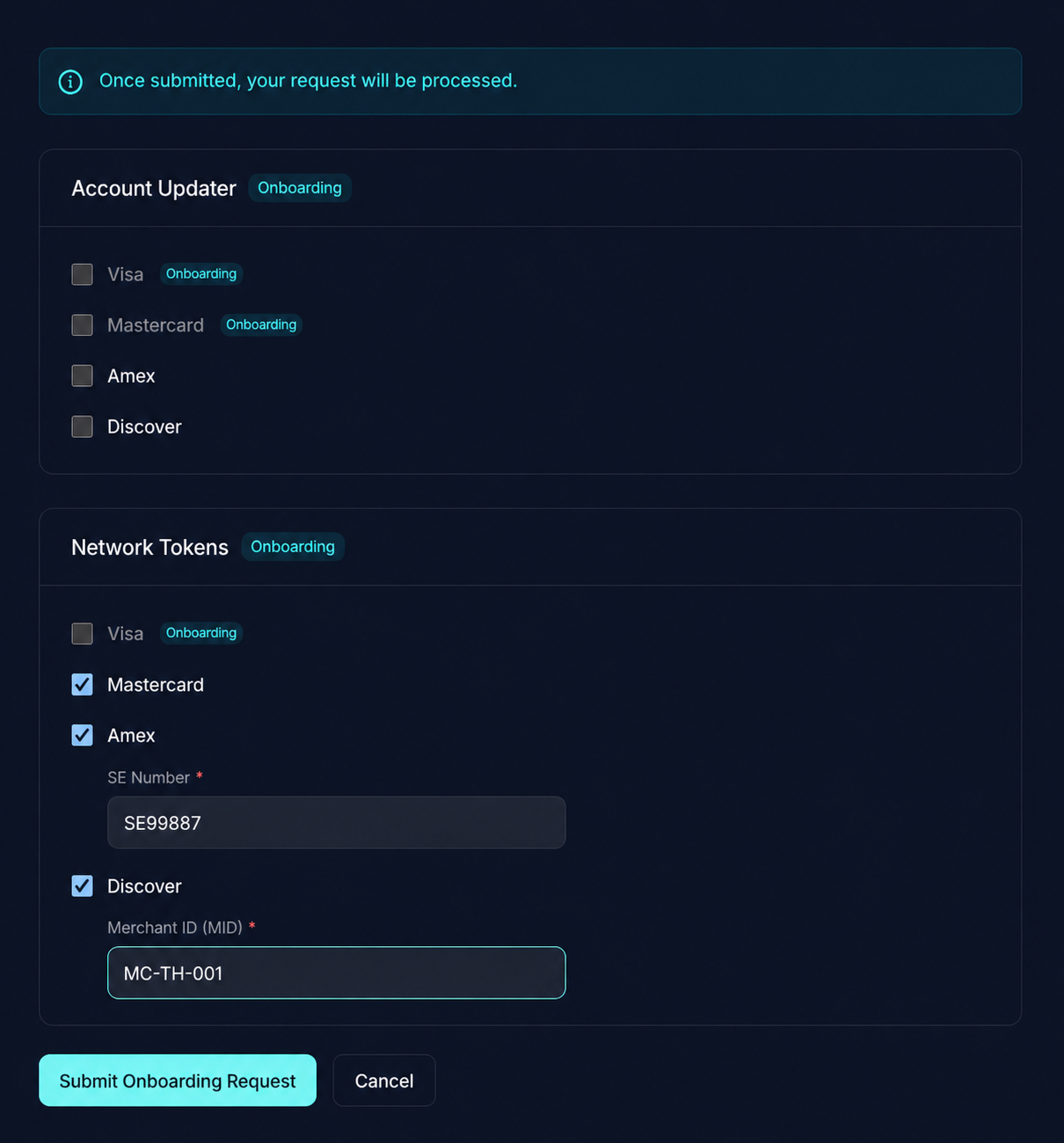
A network can be selected for onboarding only when it is in inactive or failed status. Networks already in active or onboarding are not selectable, since their credentials are either accepted or still being processed by the network. Onboarding itself is only available when at least one network on the merchant has work left to do; if every network for every service is already active or onboarding, there is nothing to request.
When a network is in failed status, its previously submitted configuration is preserved and pre-filled in the form so resubmission only requires correcting the flagged value, not re-entering every identifier. The failed-network callout on the detail page identifies which field caused the rejection.
A successful submission moves each selected network into onboarding.
Status Glossary
Each AU or NT service and each card network within a service carries its own status. The service-level status is a roll-up across that service's networks.
| Status | Meaning |
|---|---|
inactive | Not onboarded. The network has not been requested, or the service has not been configured for this merchant. |
onboarding | Request submitted to the card network. Waiting for the network to complete setup. No API calls are billable against this network yet. |
active | Onboarded and usable. You can include this merchant's merchant_id when calling AU or NT APIs for this card network. |
failed | The card network rejected the submitted configuration. Read the failed-network callout on the merchant detail page, correct the flagged value, and re-request onboarding. |
For API usage once a merchant is active, see the Tenant Merchants API.