Network Tokens Implementation
Enterprise-ready network token payments with reduced PCI scope and issuer trust.Network tokenization replaces raw card numbers with issuer-managed tokens for secure reuse, enabling flexible, PSP-agnostic payment flows with full programmatic control over token lifecycle, authentication, and processor routing—without requiring every transaction to pass through the vault.
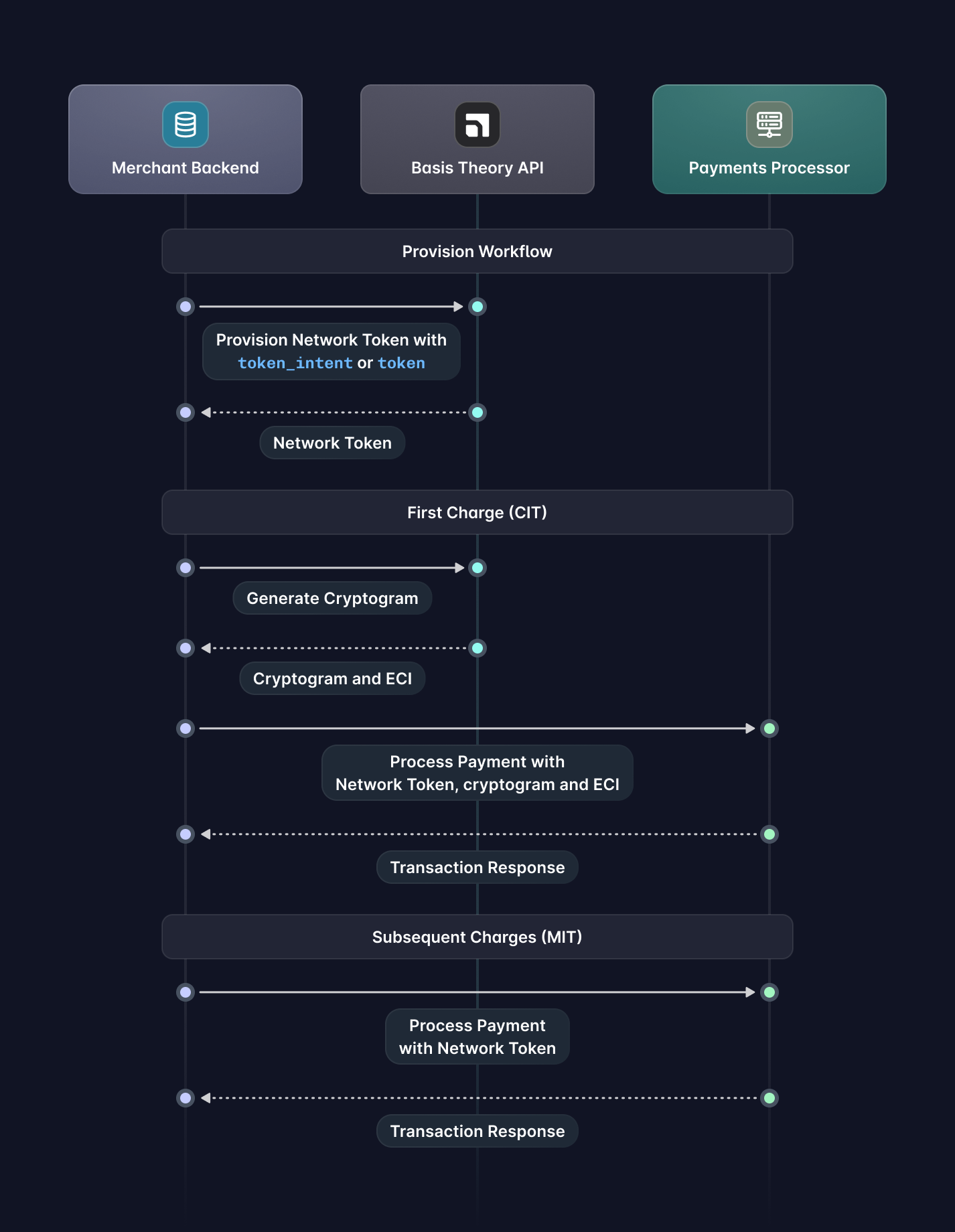
This guide covers the payment lifecycle with Basis Theory Network Tokens, from provisioning and the first customer-initiated transaction (CIT) to subsequent merchant-initiated transactions (MITs), including processor integrations that keep sensitive card data out of your environment and aligned with issuer expectations.
If you are not yet collecting your customers' cards with Basis Theory, here are a few guides you can explore:
- Replace Processor iFrames - capture new cards in the frontend;
- Recollect Security Code - patch existing cards with CVC/CVV in the frontend;
- Receive Cards via API / Webhooks - receive cards in API requests;
Getting Started
To get started, you will need to create a Basis Theory Account and a TEST Tenant.
Private Application
You will need a Private Application to allow your backend to call Basis Theory APIs. Click here to create one using the Basis Theory Customer Portal.
This will create an application with the following Access Controls:
- Permissions:
network-token:create,network-token:reveal,network-token:cryptogram,proxy:invoke
key from the created Private Application as it will be used later in this guide.Provision a Network Token
After a card has been collected from the user, merchants can provision Network Tokens against the card networks by calling the Create a Network Token API while passing either the token_intent_id or the token_id. This call is not reliably idempotent: whether a repeat request returns the existing Network Token depends on the card network. Store the returned id against the card and reuse it rather than re-provisioning. See Deduplication.
- Token Intent
- Token
curl 'https://api.basistheory.com/network-tokens' \
-X 'POST' \
-H 'BT-API-KEY: <PRIVATE_API_KEY>' \
-H 'Content-Type: application/json' \
-d '{
  "token_intent_id": "d2cbc1b4-5c3a-45a3-9ee2-392a1c475ab4",
  "cardholder_info": {
    "name": "John Doe",
    "address": {
      "line1": "123 Main Street",
      "line2": "Apt 4B",
      "line3": "Building 7",
      "postal_code": "90210",
      "city": "Beverly Hills",
      "state_code": "CA",
      "country_code": "USA"
    }
  }
}'
curl 'https://api.basistheory.com/network-tokens' \
-X 'POST' \
-H 'BT-API-KEY: <PRIVATE_API_KEY>' \
-H 'Content-Type: application/json' \
-d '{
  "token_id": "1cd9c8bf-99fd-4784-ba69-68b15b301019",
  "cardholder_info": {
    "name": "John Doe",
    "address": {
      "line1": "123 Main Street",
      "line2": "Apt 4B",
      "line3": "Building 7",
      "postal_code": "90210",
      "city": "Beverly Hills",
      "state_code": "CA",
      "country_code": "USA"
    }
  }
}'
If the card information is correct and the issuer supports it, a new Network Token will be generated:
{
  "id": "1a97a7f6-5d7e-4a8e-ad08-c2472cfedf7f",
  "tenant_id": "4aee08b9-5557-474b-a120-252e01fc7b0f",
  "data": {
    "number": "4446878164352273",
    "expiration_month": 11,
    "expiration_year": 2030
  },
  "card": {
    "last4": "0002",
    "expiration_month": 10,
    "expiration_year": 2027
  },
  "network_token": {
    "bin": "444687",
    "last4": "2273",
    "expiration_month": 11,
    "expiration_year": 2030,
    "brand": "visa",
    "funding": "credit",
    "authentication": "sca_required",
    "issuer": {
      "country": "GB",
      "name": "3DS Test Cards (TEST)"
    },
    "issuer_country": {
      "alpha2": "GB",
      "name": "CENTRAL FEDERAL SAVINGS AND LOAN ASSOCIATION",
      "numeric": "826"
    },
    "segment": "Commercial",
    "product": {
      "code": "G"
    }
  },
  "par": "V2831416512995186306443704057",
  "status": "active",
  "created_by": "0bc89db5-fadd-4d57-af93-10472e35ebd3",
  "created_at": "2025-03-10T14:23:56.5580574+00:00"
}
What you should store in your database:
- [Required] The Network Token
id, associating it with the rightful customer account. - The Network Token
data, enabling you to process payments without having to fetch it later.
Expiration Date Overrides
When provisioning from a token or token intent, Basis Theory uses the source card expiration date stored on that record by default. If you need to provision with a different expiration date, include top-level expiration_month and expiration_year fields in the request.
These fields are used in place of the source card expiration date for this provisioning request only. They do not update the token or token intent. Both fields must be sent together, and they are only valid when the request uses token_id or token_intent_id.
For payload examples using token_id and token_intent_id with expiration date overrides, see the Create a Network Token request examples.
Active Card Check
Network Token provisioning can act as an early validation step during card onboarding, indicating that a card is real, recognized by the network, and eligible for tokenized transactions. Successful provisioning reflects issuer participation at tokenization time and may help reduce false-positive declines in later payments.
However, provisioning is not a payment verification mechanism and is subject to coverage limitations. A card may be valid and payment-ready yet still be ineligible for network tokenization due to issuer, network, region, or use-case constraints. Provisioning does NOT:
- Authorize a transaction
- Confirm funds availability
- Validate CVC or expiry with transaction-level guarantees
- Establish cardholder intent or provide liability shift
- Does not replace a $0 or small-amount authorization where required
Test Cases and Error Handling
Network Token provisioning can fail for issuer, network, or data-related reasons, and should be handled explicitly in your integration. We recommend implementing the scenarios outlined in our Network Token test cases and error handling documentation to ensure clear remediation paths, appropriate retries, and a smooth user experience.
First Charge
Once a Network Token has been provisioned, merchants can process customer-initiated transactions (CITs) using the token in place of the card number, allowing issuers to apply dynamic authentication and token-specific controls during authorization.
Generating a Cryptogram
A cryptogram is a transaction-specific, one-time security value generated by the issuer for a Network Token and is commonly required for customer-initiated transaction authorizations. It allows the issuer to verify that the transaction is fresh, bound to the specific request, and authorized in real time by the customer, providing stronger protection than static card data alone.
This is done by calling the Generate a Cryptogram API passing the Network Token id:
curl 'https://api.basistheory.com/network-tokens/<NETWORK_TOKEN_ID>/cryptogram' \
-X 'POST' \
-H 'BT-API-KEY: <PRIVATE_API_KEY>' \
-H 'Content-Type: application/json'
Which returns a new cryptogram and associated ECI:
{
  "cryptogram": "5hgXjWJBDkiONPQ6EFxtgA==",
  "eci": "07"
}
Processing Payment
Now that you have a Network Token and a cryptogram, both handled outside of PCI scope, you can route these credentials directly to your payment processor or acquirer API for authorization:
- Checkout.com
- Stripe
- Adyen
- Braintree
In Checkout.com, you can charge with a Network Token by calling the /payments API.
curl 'https://<CHECKOUT_PREFIX>.api.sandbox.checkout.com/payments' \
-X 'POST' \
-H 'Authorization: Bearer <CHECKOUT_SECRET_KEY>' \
-H 'Content-Type: application/json' \
--data '{
  "source": {
    "type": "network_token",
    "token_type": "vts",
    "number": "4446878164352273",
    "expiry_month": "11",
    "expiry_year": "2030",
    "eci": "07",
    "cryptogram": "5hgXjWJBDkiONPQ6EFxtgA=="
  },
  "amount": 1000,
  "currency": "USD",
  "processing_channel_id": "pc_svyx12xvaaduraq3ckb2gwnvzq"
}'
{
  "id": "pay_myvj6zxrt45edgrswrliyxbtnq",
  "approved": true,
  "status": "Authorized",
  "amount": 1000,
  "currency": "USD",
  "source": {
    "type": "card",
    "id": "src_gguer4xlawke3ctljczft7573a",
    ...
  },
  "scheme_id": "647537243670773",
  ...
}
In Stripe, you can charge with a Network Token by creating a Payment Intent.
curl https://api.stripe.com/v1/payment_intents \
  -H "Authorization: Bearer <STRIPE_SECRET_KEY>" \
  -d "amount=1000" \
  -d "currency=usd" \
  -d "confirm=true" \
  -d "payment_method_types[]=card" \
  -d "payment_method_data[type]=card" \
  -d "payment_method_data[card][exp_month]=11" \
  -d "payment_method_data[card][exp_year]=2030" \
  -d "payment_method_data[card][last4]=2273" \
  -d "payment_method_data[card][network_token][number]=4446878164352273" \
  -d "payment_method_data[card][network_token][exp_month]=11" \
  -d "payment_method_data[card][network_token][exp_year]=2030" \
  -d "payment_method_options[card][network_token][cryptogram]=5hgXjWJBDkiONPQ6EFxtgA==" \
  -d "payment_method_options[card][network_token][electronic_commerce_indicator]=07"
{
  "id": "pi_3MtwBwLkdIwHu7ix28a3tqPa",
  "status": "succeeded",
  "object": "payment_intent",
  "payment_method": "pm_1QaKJmG9VRQ2700S5JcsJv4Q",
  "latest_charge": {
    "payment_method_details": {
      "card": {
        "network_transaction_id": "8723dfab9c4e56a1b8cd0291ef67ac43"
        ...
      }
      ...
    }
    ...
  }
  ...
}
In Adyen, you can charge with a Network Token by calling the /payments API.
curl 'https://checkout-test.adyen.com/v71/payments' \
-X 'POST' \
-H 'X-API-Key: <ADYEN_API_KEY>' \
-H 'Content-Type: application/json' \
--data '{
  "amount": {
    "value": 1000,
    "currency": "USD"
  },
  "paymentMethod": {
    "type": "networkToken",
    "brand": "visa",
    "number": "4446878164352273",
    "expiryMonth": "11",
    "expiryYear": "2030"
  },
  "mpiData": {
    "directoryResponse": "Y",
    "authenticationResponse": "Y",
    "tokenAuthenticationVerificationValue": "5hgXjWJBDkiONPQ6EFxtgA==",
    "eci": "07"
  },
  "reference": "YourTransactionReference",
  "shopperReference": "YourShopperId",
  "shopperInteraction": "Ecommerce",
  "recurringProcessingModel":  "CardOnFile",
  "merchantAccount": "YourMerchantAccount"
}'
{
  "pspReference": "CNX333SGC7ZN6KV5",
  "merchantReference": "YourTransactionReference",
  "resultCode": "Authorised",
  "amount": {
    "currency": "USD",
    "value": 1000
  },
  "additionalData": {
    "networkTxReference": "377216678422238",
    ...
  },
  ...
}
In Braintree, you can charge with a Network Token by following the Bring Your Own Token (BYOT) flow. First, tokenize the Network Token to obtain a single-use paymentMethod.id, then pass that id into a chargeCreditCard mutation as described in Braintree's BYOT guide.
curl 'https://payments.sandbox.braintree-api.com/graphql' \
-X 'POST' \
-H 'Authorization: Basic <BRAINTREE_BASIC_AUTH>' \
-H 'Braintree-Version: 2019-01-01' \
-H 'Content-Type: application/json' \
--data '{
  "query": "mutation TokenizeNetworkToken($input: TokenizeNetworkTokenInput!) { tokenizeNetworkToken(input: $input) { paymentMethod { id usage } } }",
  "variables": {
    "input": {
      "networkToken": {
        "number": "4446878164352273",
        "expirationMonth": 11,
        "expirationYear": 2030,
        "cryptogram": "5hgXjWJBDkiONPQ6EFxtgA==",
        "originDetails": {
          "origin": "NETWORK_TOKEN",
          "sourceCardLast4": "2273"
        }
      }
    }
  }
}'
{
  "data": {
    "tokenizeNetworkToken": {
      "paymentMethod": {
        "id": "tokencc_bc_abc123_xyz",
        "usage": "SINGLE_USE"
      }
    }
  }
}
Save the Network Transaction identifier returned by the processor during the initial transaction. This allows you to seamlessly charge the card with new processors or acquirers in the future and achieve the best approval rates. Refer to your current processor’s documentation or support for guidance on accessing this value.
Subsequent Charges
After the initial customer-initiated transaction, merchants can process merchant-initiated transactions (MITs) using the stored Network Token for follow-on charges such as subscriptions, renewals, or delayed captures. These transactions rely on stored-credential indicators and the original customer mandate, and typically do not require generating a new cryptogram (though some processors, such as Adyen, may still expect cryptogram fields in the request).
- Checkout.com
- Stripe
- Adyen
- Braintree
In Checkout.com, you can charge with a Network Token by calling the /payments API.
Pass the Network Transaction identifier of the first charge into the previous_payment_id field.
curl 'https://<CHECKOUT_PREFIX>.api.sandbox.checkout.com/payments' \
-X 'POST' \
-H 'Authorization: Bearer <CHECKOUT_SECRET_KEY>' \
-H 'Content-Type: application/json' \
--data '{
  "source": {
    "type": "network_token",
    "token_type": "vts",
    "number": "4446878164352273",
    "expiry_month": "11",
    "expiry_year": "2030",
    "stored": true
  },
  "amount": 1000,
  "currency": "USD",
  "payment_type": "Recurring",
  "merchant_initiated": true,
  "processing_channel_id": "pc_svyx12xvaaduraq3ckb2gwnvzq",
  "previous_payment_id": "<first_network_transaction_identifier>"
}'
{
  "id": "pay_myvj6zxrt45edgrswrliyxbtnq",
  "approved": true,
  "status": "Authorized",
  "amount": 1000,
  "currency": "USD",
  "source": {
    "type": "card",
    "id": "src_gguer4xlawke3ctljczft7573a",
    ...
  },
  "scheme_id": "647537243670773",
  ...
}
In Stripe, you can charge with a Network Token by creating a Payment Intent.
Pass the Network Transaction identifier of the first charge into the payment_method_options[card][mit_exemption][network_transaction_id] field.
curl https://api.stripe.com/v1/payment_intents \
  -H "Authorization: Bearer <STRIPE_SECRET_KEY>" \
  -d "amount=1000" \
  -d "currency=usd" \
  -d "confirm=true" \
  -d "payment_method_types[]=card" \
  -d "payment_method_data[type]=card" \
  -d "payment_method_data[card][exp_month]=11" \
  -d "payment_method_data[card][exp_year]=2030" \
  -d "payment_method_data[card][last4]=2273" \
  -d "payment_method_data[card][network_token][number]=4446878164352273" \
  -d "payment_method_data[card][network_token][exp_month]=11" \
  -d "payment_method_data[card][network_token][exp_year]=2030" \
  -d "payment_method_options[card][mit_exemption][network_transaction_id]=<first_network_transaction_identifier>"
{
  "id": "pi_3MtwBwLkdIwHu7ix28a3tqPa",
  "status": "succeeded",
  "object": "payment_intent",
  "payment_method": "pm_1QaKJmG9VRQ2700S5JcsJv4Q",
  "latest_charge": {
    "payment_method_details": {
      "card": {
        "network_transaction_id": "8723dfab9c4e56a1b8cd0291ef67ac43"
        ...
      }
      ...
    }
    ...
  }
  ...
}
In Adyen, you can charge with a Network Token by calling the /payments API.
curl 'https://checkout-test.adyen.com/v71/payments' \
-X 'POST' \
-H 'X-API-Key: <ADYEN_API_KEY>' \
-H 'Content-Type: application/json' \
--data '{
  "amount": {
    "value": 1000,
    "currency": "USD"
  },
  "paymentMethod": {
    "type": "networkToken",
    "brand": "visa",
    "number": "4446878164352273",
    "expiryMonth": "11",
    "expiryYear": "2030"
  },
  "mpiData": {
    "directoryResponse": "Y",
    "authenticationResponse": "Y",
    "tokenAuthenticationVerificationValue": "5hgXjWJBDkiONPQ6EFxtgA==",
    "eci": "07"
  },
  "additionalData": {
    "networkTxReference": "<first_network_transaction_identifier>"
  },
  "reference": "YourTransactionReference",
  "shopperReference": "YourShopperId",
  "shopperInteraction": "Ecommerce",
  "recurringProcessingModel": "CardOnFile",
  "merchantAccount": "YourMerchantAccount"
}'
{
  "pspReference": "CNX333SGC7ZN6KV5",
  "merchantReference": "YourTransactionReference",
  "resultCode": "Authorised",
  "amount": {
    "currency": "USD",
    "value": 1000
  },
  "additionalData": {
    "networkTxReference": "377216678422238",
    ...
  },
  ...
}
In Braintree, you can charge with a Network Token using the Bring Your Own Token (BYOT) flow. For merchant-initiated transactions, omit the cryptogram when tokenizing, then pass the prior network transaction reference into options.externalVault.verifyingNetworkTransactionId and set transaction.paymentInitiator on the chargeCreditCard mutation as described in Braintree's BYOT guide.
curl 'https://payments.sandbox.braintree-api.com/graphql' \
-X 'POST' \
-H 'Authorization: Basic <BRAINTREE_BASIC_AUTH>' \
-H 'Braintree-Version: 2019-01-01' \
-H 'Content-Type: application/json' \
--data '{
  "query": "mutation TokenizeNetworkToken($input: TokenizeNetworkTokenInput!) { tokenizeNetworkToken(input: $input) { paymentMethod { id usage } } }",
  "variables": {
    "input": {
      "networkToken": {
        "number": "4446878164352273",
        "expirationMonth": 11,
        "expirationYear": 2030,
        "originDetails": {
          "origin": "NETWORK_TOKEN",
          "sourceCardLast4": "2273"
        }
      }
    }
  }
}'
{
  "data": {
    "tokenizeNetworkToken": {
      "paymentMethod": {
        "id": "tokencc_bc_abc123_xyz",
        "usage": "SINGLE_USE"
      }
    }
  }
}
FAQ
How broad is Network Token coverage?
Network Token coverage varies by issuer, region, and use case, but is already strong in mature markets. In the United States and Europe, an estimated 80–90% of card volume is eligible for network tokenization, driven by widespread Tier-1 issuer adoption.
Networks are making tokenization a strategic priority: Visa positions network tokens as the preferred credential for digital commerce, highlighting improved authorization rates and reduced fraud (Visa Tokenization Overview), while Mastercard has publicly committed to making tokenized credentials the default for e-commerce and reaching 100% e-commerce tokenization in Europe by 2030 (Mastercard 2030 vision).
Coverage is not yet universal: some issuers, card programs, regions, or flows may still be ineligible. Integrations should always detect token availability and support fallbacks (such as PAN or gateway tokens) to ensure consistent payment acceptance.
How can I manage the lifecycle of a Network Token?
Network Tokens support standard lifecycle actions that let you control how and when a token can be used. You can temporarily suspend a token to prevent transactions without losing the ability to restore it later, reactivate a suspended token to resume payments, or permanently delete a token when it is no longer needed. These actions allow you to respond to events like account changes, suspected fraud, or customer requests while maintaining control over token usage.
Does Network Token provisioning add latency to my checkout flow?
Network Token provisioning depends on card network and issuer response times, not the merchant integration itself. Provisioning typically completes in 300–1000 ms and should be performed once per card, making it best suited for card onboarding rather than checkout. Store the Network Token id against the card; repeat calls do not reliably return the existing one.
What is the latency impact of generating a cryptogram?
Cryptogram generation is a lightweight, real-time operation backed by the networks and issuers. Typical response times are 100–500 ms, making it suitable for synchronous customer-initiated checkout flows.
What are common ways to provision a Network Token during “add card” in checkout?
A common synchronous approach is a two-step flow that keeps checkout straightforward while still maximizing token coverage:
- Add card (setup step): Collect the card and attempt Network Token provisioning immediately. If provisioning succeeds, store the Network Token
id(and optionally tokendata) for reuse. If it fails due to coverage or issuer rules, fall back to storing the underlying card token and proceed. - Place order (payment step): When the customer confirms checkout, generate a cryptogram for the Network Token (CIT) and submit the authorization to your processor using the Network Token + cryptogram/ECI.
This works well when you want tokenization to be “ready” by the time the user clicks Pay, and it keeps failures contained to the “add card” moment.
Can we accept the order first and process payment asynchronously (Amazon-style)?
Yes. An async approach prioritizes checkout conversion by decoupling order placement from network and issuer-dependent token operations:
- Place order first: Create the order and confirm inventory/shipping, then queue payment processing in the background.
- Provision and charge asynchronously: Attempt Network Token provisioning (if not already done), generate a cryptogram if it’s a CIT-equivalent flow, and submit the authorization. If tokenization isn’t available, fall back to PAN-token-based processing.
- Handle outcomes: If the charge succeeds, finalize the order. If it fails, notify the customer to update their payment method or retry with a different card.
This pattern reduces user-visible latency and makes network/issuer variability less likely to interrupt checkout, at the cost of additional operational complexity (payment state machine, notifications, retries, and reconciliation).
How long is a cryptogram valid?
Cryptograms are short-lived, single-use values generated for a specific transaction context. While exact validity windows are defined by the card networks and issuers, cryptograms are generally expected to be used immediately after generation. If a transaction is delayed, abandoned, or materially changed, a new cryptogram should be generated before retrying the authorization.
Can the same cryptogram be reused when retrying with a different processor?
In some cases, yes, but only within a narrow window and when the transaction has not been authorized, the decline reason allows retry, and the transaction context remains unchanged. Cryptogram reuse behavior is ultimately governed by the networks and issuers, and support may vary by issuer and processor. When in doubt, generating a new cryptogram is the safest approach, especially if retrying after a delay or modifying any transaction details.
Do I need Account Updater if I have Network Tokens?
Network Tokens provide built-in lifecycle management, automatically handling events like reissues and expiration updates for supported cards. However, coverage is not universal, so you may still want to use Account Updater as a fallback for cards or regions that do not support network tokenization, ensuring continuity across your entire card portfolio.
Can I backfill Network Tokens for cards I already have on file?
Yes. Existing cards stored in the vault can be retroactively network-tokenized through a backfill process. Because CVC/CVV is typically not available for stored cards, backfilled provisioning depends on issuer and network eligibility and may result in lower coverage compared to tokens provisioned at initial card collection. This process is coordinated with Basis Theory Support and allows merchants to extend the benefits of network tokenization to previously stored credentials without requiring customers to re-enter their card details.
What happens to the MIT chain when a Network Token is provisioned for a card I already store?
Merchant-initiated transactions (MITs) are linked to the customer-initiated transaction (CIT) in which the cardholder provided consent to store and reuse their payment credentials. This linkage is established using the CIT Network Transaction Identifier (NTI).
Issuers use the NTI to associate the MIT with the original cardholder-authorized transaction and distinguish it from an unauthorized charge. An MIT that references a CIT the issuer cannot match may still be authorized, but it can receive less favorable interchange qualification and, depending on the issuer, may be declined.
When Basis Theory provisions a Network Token under your Token Requestor ID (TRID) for a card already stored on file, the token becomes a new payment credential representing the same underlying account. The card networks define how subsequent merchant-initiated transactions (MITs) must reference an originating transaction, but their public documentation does not clearly define whether a network transaction identifier established by an earlier PAN-based CIT remains valid when subsequent transactions use the Network Token instead.
To avoid relying on that ambiguity, establish a new transaction reference using the tokenized credential. Process a CIT with the Network Token and its cryptogram, then use the NTI returned by that transaction when submitting subsequent MITs. This establishes the MIT chain using the same credential that will be used for future transactions.
If there is no natural CIT opportunity (e.g., when backfilling existing cards), a zero-amount account verification can be used to establish the tokenized credential without requiring the customer to re-enter their card details. Submit the verification using the Network Token and, where applicable, its transaction cryptogram, then use the resulting network transaction identifier for subsequent MITs.
What happens when a Network Token expires?
Network Tokens are kept current automatically; you don't re-provision them on expiry. When the issuer reissues or updates the underlying card, the Network Token is updated in place: its id stays the same, and only the stored expiration_month/expiration_year (and status) change. The source token you provisioned from is left untouched, since keeping a stored card current is Account Updater's job. A token can also be suspended or deleted over its lifecycle; if a token is deleted it no longer exists, so you'd provision a new one.
Do I need to create a new Network Token when one expires?
No. Renewals happen automatically, so there is nothing to re-create. If you call POST /network-tokens again for a card that already has a Network Token in your tenant, the API returns the existing token — flagged with _extras.deduplicated: true in the response — instead of creating a new id, token value, or expiry.
To read the refreshed expiration date, fetch the token with Get a Network Token; the response includes the current expiration_month, expiration_year, and status. To find out when a token changes, subscribe to the network-token.updated webhook. The webhook tells you a change happened but doesn't include the new expiry, so follow it up with a GET. And if you don't use the webhook, the token still stays up to date — you just aren't notified when it changes.