node22
The node22 runtime image represents a major evolution in how you run custom code within Basis Theory. Built with developer experience and security in mind, node22 gives you unprecedented control over your serverless functions.
Why node22?
-
Manage your own dependencies: Install any npm package directly in your reactor. No more requesting packages or working around version limitations.
-
Modern Node.js runtime: Run on Node.js 22 with the latest JavaScript features, better performance, and active security updates.
-
Configurable resources: Configure timeout and resources to match your workload requirements.
-
Warm concurrency: Keep your functions warm and customize how many instances stay ready to handle requests.
-
Simplified code contract: A streamlined request/response pattern with enhanced logging support and full HTTP response control.
-
Fine-grained permissions: Specify exactly which Basis Theory permissions your code needs without requiring a separate Application.
Getting Started
To use this runtime, specify runtime.image: "node22" when creating your resource. For API details, see:
For the code contracts when using node22 in a proxy transform, see the request transform contract and response transform contract.
Reactors using node22 can run synchronously or asynchronously. Proxy transforms always run synchronously.
Runtime Options
The node22 runtime is enabled by specifying a runtime object with image: "node22". Within the runtime object, you can configure dependencies, resolutions, timeout, resources, warm concurrency, and permissions. Reactors can also be configured for asynchronous execution.
Runtime Image
The runtime.image property specifies which runtime image to use. See available runtimes for details on each option.
| Value | Description |
|---|---|
node-bt | Default runtime with curated dependencies |
node22 | Modern Node.js 22 with custom npm packages and configurable resources |
Dependencies
Specify npm packages to install in your runtime environment via runtime.dependencies. Packages are installed at build time when the resource is created or updated.
{
  "runtime": {
    "image": "node22",
    "dependencies": {
      "stripe": "18.4.0",
      "lodash": "4.17.21",
      "axios": "1.7.9"
    }
  }
}
Pinned versions are required. Do not use version ranges like "^18.4.0" or "~18.4.0". Specify exact versions (e.g., "18.4.0").
Vulnerability Scanning
node22 dependencies are scanned during deployment, and deployed runtime artifacts are scanned continuously after deployment.
If HIGH or CRITICAL vulnerabilities are detected during deployment, provisioning fails until dependencies are remediated.
See Runtime Vulnerability Scanning for scan behavior, failure details, notification cadence, and webhook events.
It is still recommended to run dependency scans in your own CI process (for example npm audit and Trivy) before deploying.
Resolutions
Use runtime.resolutions to override versions of dependencies installed indirectly through other packages. Overrides are applied at build time when the resource is created or updated.
{
  "runtime": {
    "image": "node22",
    "dependencies": {
      "some-sdk": "1.2.3"
    },
    "resolutions": {
      "minimist": "1.2.8"
    }
  }
}
Pinned versions are required. Do not use version ranges like "^1.2.8" or "~1.2.8". Specify exact versions (e.g., "1.2.8").
Use runtime.resolutions when a dependency in runtime.dependencies installs a transitive dependency version you need to replace, such as for a security patch or compatibility fix.
Timeout
Maximum execution time for your code in seconds. The supported range depends on how the runtime is used.
| Execution mode | Supported range | Default |
|---|---|---|
| Synchronous Reactor or Proxy transform | 10 to 30 seconds | 10 seconds |
| Asynchronous Reactor | 10 to 900 seconds | 10 seconds |
Resources
Control the compute resources allocated to your runtime.
| Value | Memory (MB) | When to use |
|---|---|---|
standard | 256 | Most workloads, typical operations, standard processing needs |
large | 1024 | Operations that need more resources than standard, heavier workloads |
xlarge | 2048 | Operations requiring maximum resources, mainly for resource-intensive workloads |
CPU capacity scales proportionally with memory. Larger resource sizes receive proportionally more CPU capacity.
Warm Concurrency
runtime.warm_concurrency controls how many pre-initialized instances of your reactor are kept ready to handle requests immediately, without initialization delay.
Warm instances are already initialized and can start handling requests right away. This helps reduce latency for workloads that are sensitive to startup time.
| Tenant Type | Default | Description |
|---|---|---|
| Test | 0 | No warm instances |
| Production | 1 | One warm instance maintained |
For many workloads, keeping at least one warm instance can improve tail latency by reducing cold starts during normal traffic.
To request higher warm concurrency limits, visit Settings > Quotas in the Portal.
Cold Starts
A cold start happens when a request arrives and no warm instance is available to handle it. In that case, Basis Theory initializes a new instance before running your reactor.
If a warm instance is available, the request executes immediately. If all warm instances are busy (or none are configured), the request waits for a new instance to initialize.
What to expect:
- Cold start duration depends on your reactor's dependencies and code size. More or larger dependencies generally increase initialization time.
- For latency-sensitive workloads, set
warm_concurrencyto at least1to reduce cold starts. - The first invocation after a reactor is provisioned or updated may experience a cold start.
Permissions
Grant Basis Theory Application permissions to your runtime via runtime.permissions. These permissions determine what operations the code can perform when it executes.
{
  "runtime": {
    "image": "node22",
    "permissions": ["token:reveal", "token:create"]
  }
}
Common permissions include token:reveal (detokenize values) and token:create (create new tokens). See the full permissions reference for all available options.
States
The node22 runtime uses a state machine to track provisioning and runtime status. Understanding these states helps you build robust integrations that handle asynchronous operations correctly.
| State | Description |
|---|---|
creating | Initial provisioning in progress |
active | Ready to invoke |
updating | Modification in progress |
failed | Provisioning or update failed |
outdated | Update failed, but previous version is still functional |
State Diagram
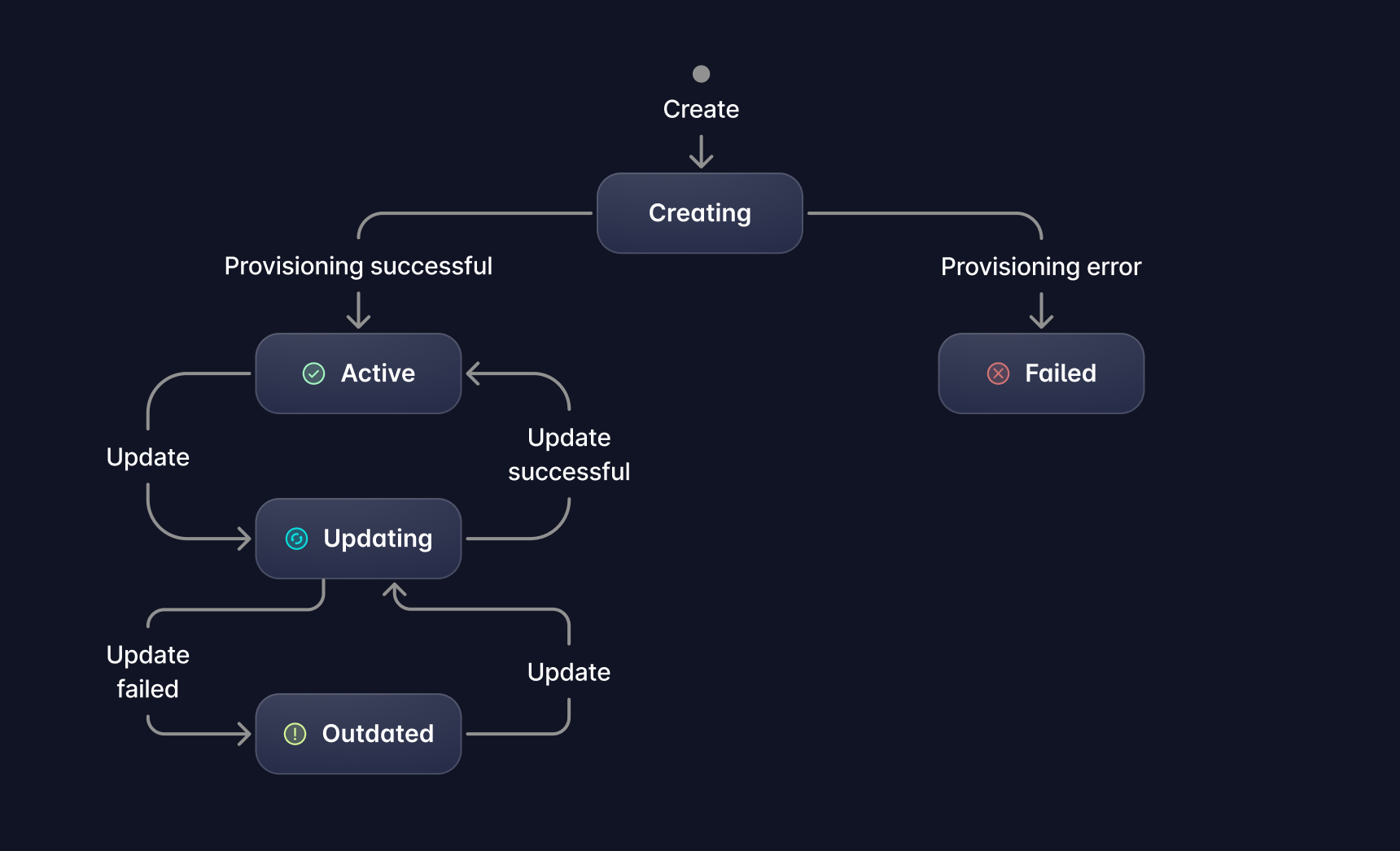
State Transitions
| Transition | Trigger |
|---|---|
| creating → active | Successful provisioning |
| creating → failed | Provisioning error (e.g., invalid dependencies, syntax error in code) |
| active → updating | Update initiated via PUT or PATCH |
| updating → active | Successful update |
| updating → outdated | Update failed (previous version remains active and can still be invoked) |
| outdated → updating | New update initiated via PUT or PATCH |
Operation Behavior
The following table shows which operations are allowed based on the current state of a Reactor or Proxy using the node22 runtime:
| State | Invoke | Update | Delete |
|---|---|---|---|
creating | ❌ | ❌ | ❌ |
active | ✅ | ✅ | ✅ |
updating | ❌ | ❌ | ❌ |
failed | ❌ | ✅ | ✅ |
outdated | ✅ | ✅ | ✅ |
Note: In outdated state, Invoke executes the previous working version.
Asynchronous Reactors
See Asynchronous Reactors for the shared submit-and-retrieve workflow.
Set runtime.async to true to configure a node22 Reactor for asynchronous execution. This option applies only to Reactors and is not supported for Proxy transforms.
{
  "runtime": {
    "image": "node22",
    "async": true,
    "timeout": 900
  }
}
Invoke an asynchronous Reactor through the asynchronous Reactor endpoint, then poll for its result.
Partial Results
During an asynchronous node22 invocation, the Reactor handler receives asyncRecords. Call asyncRecords.write(recordId, value) to preserve intermediate results before the Reactor finishes:
module.exports = async function (event) {
  const { req, asyncRecords } = event;

  await asyncRecords.write("customer-myCustomerId1234", {
    customer_id: req.customer_id,
    status: "processed"
  });

  return {
    res: {
      body: { processed: true },
      statusCode: 200
    }
  };
};
Await each write so your Reactor can handle a failed record upload. Each invocation supports:
- Up to
25records. - Serialized values up to
256 KiBper record. - Record IDs from
1to64characters using letters, numbers, underscores, and hyphens. The first character must be a letter or number.
Record IDs must be unique within an invocation, and record values must be JSON-serializable. Use each record's id instead of depending on array order.
If the Reactor fails or times out after writing records, successfully written records remain available in the final result.
Comparison with node-bt
For a detailed comparison between node22 and node-bt, see the Runtime comparison table.