What are Reactors?
A Reactor is a serverless compute service allowing Node.js code hosted in Basis Theory to be executed against your tokens completely isolated away from your application and systems.
Reactors are invokable from any system that has the ability to make HTTPS requests and access the internet.
How It Works
Reactors are serverless function runtimes, similar to AWS Lambda, Azure Functions, or Cloudflare Workers - except your applications, systems, and infrastructure never touch the sensitive plaintext data.
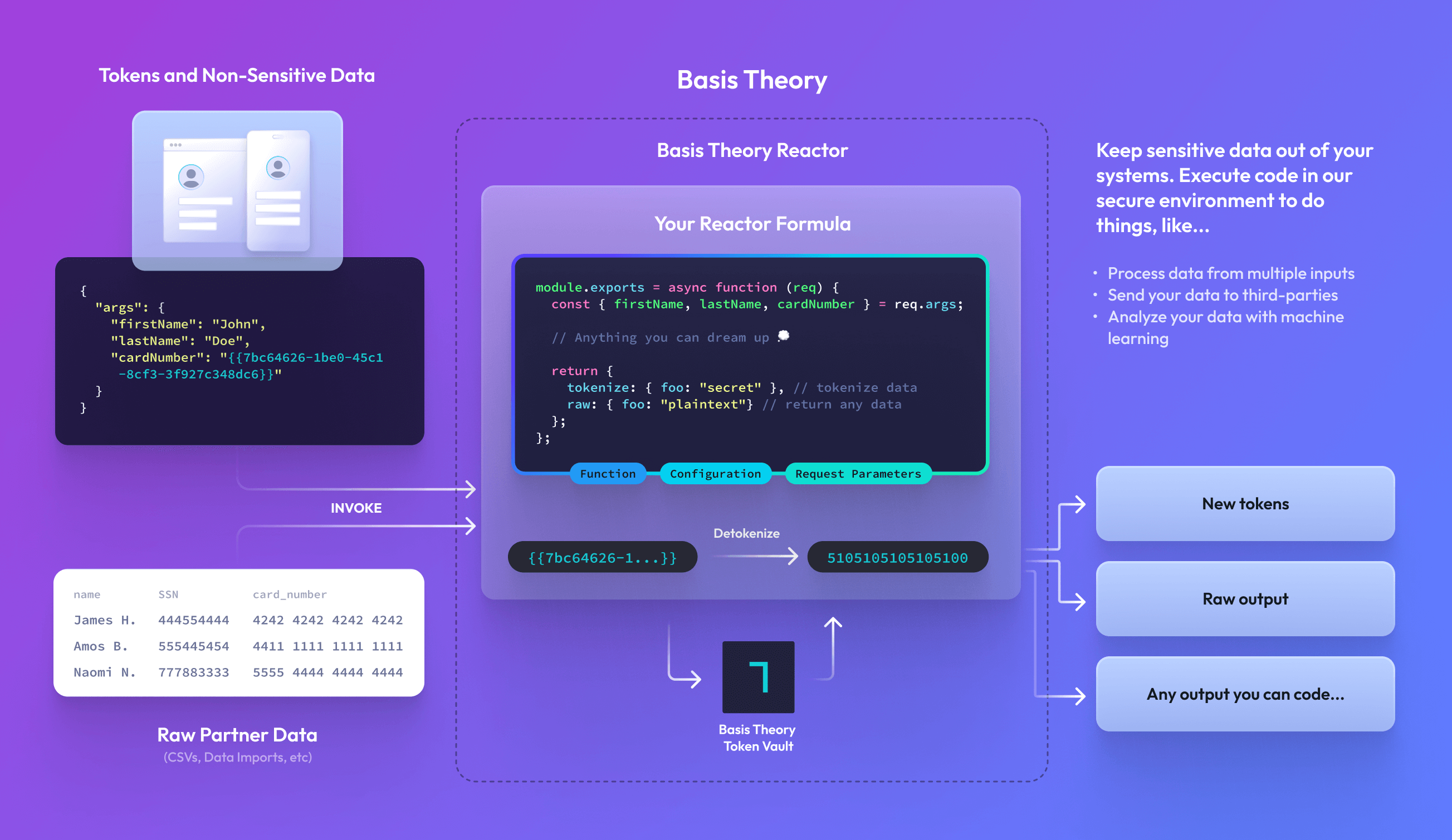
Runtimes
Reactors execute within a Runtime — a secure, isolated Node.js environment. Basis Theory offers two runtime options:
- node-bt — The default runtime with curated dependencies. Best for existing code and simple integrations.
- node22 — Modern Node.js 22 with custom npm packages, configurable resources, and built-in permissions. Best for new projects and advanced use cases.
For deployment and continuous dependency scanning behavior, see Runtime Vulnerability Scanning.
Code Contract
Reactors use a function-based code contract that receives invocation arguments and returns a response. The contract structure differs between runtimes:
- node-bt
- node22
module.exports = async function (req) {
  const { args, configuration, bt } = req;

  // Your code here

  return {
    tokenize: {
      sensitive_data: "will be tokenized"
    },
    raw: {
      non_sensitive: "returned in plaintext"
    }
  };
};
module.exports = async function (event) {
  const { req, configuration, logger } = event;

  logger.info("Processing request");

  // Your code here

  return {
    res: {
      body: {
        success: true,
        result: "processed"
      },
      headers: { "X-Custom-Header": "value" },
      statusCode: 200
    }
  };
};
Request Object
The reactor function receives a request object containing invocation arguments and configuration.
node-bt
| Attribute | Type | Description |
|---|---|---|
args | object | Arguments passed when invoking the reactor |
configuration | map<string, string> | Configuration values defined on the resource |
bt | object | Pre-configured Basis Theory SDK instance for token operations |
applicationOptions | object | Configuration information about the associated application |
applicationOptions.apiKey | string | The API key of the associated application. Useful for initializing your own SDK instance or HTTP client |
applicationOptions.baseUrl | string | The Basis Theory API URL for the application associated with the Reactor (e.g., https://api.basistheory.com). Useful to initialize @basis-theory/node-sdk or to make requests using an independent HTTP Client |
node22
| Attribute | Type | Description |
|---|---|---|
req | object | Arguments passed when invoking the reactor |
configuration | map<string, string> | Configuration values defined on the resource |
logger | object | Logger instance with info(), warn(), error() methods |
applicationOptions | object | Configuration information about the associated application |
applicationOptions.apiKey | string | The API key of the associated application. Useful for initializing your own SDK instance or HTTP client |
applicationOptions.baseUrl | string | The Basis Theory API URL (e.g., https://api.basistheory.com). Useful to initialize @basis-theory/node-sdk or to make requests using an independent HTTP Client |
Response Object
The reactor function must return a response object.
node-bt
The response supports two different types, giving you the flexibility to either securely tokenize sensitive outputs or return raw outputs:
| Attribute | Type | Description |
|---|---|---|
tokenize | object | Any object passed will be tokenized |
raw | object | Any object passed will be returned in the response |
node22
The response is an object containing the HTTP response details:
| Attribute | Type | Default | Description |
|---|---|---|---|
res.body | object | {} | Response body returned |
res.headers | map<string, string> | {} | Custom headers to include in the response |
res.statusCode | number | 200 | HTTP status code |
Creating a Reactor
Reactors are created with our Create Reactor endpoint. Once configured, each Reactor can be invoked — executing the code it has been configured with. Creating a new Reactor is as simple as passing in the code and configuration to be invoked.
- node-bt
- node22
javascript='module.exports = async function (req) {
  // Do something with req.configuration.SERVICE_API_KEY

  return {
    raw: {
      foo: "bar"
    }
  };
};'

curl "https://api.basistheory.com/reactors" \
  -H "BT-API-KEY: <MANAGEMENT_API_KEY>" \
  -H "Content-Type: application/json" \
  -X "POST" \
  -d '{
    "name": "My First Reactor",
    "code": '"$(echo $javascript | jq -Rsa .)"',
    "configuration": {
      "SERVICE_API_KEY": "key_abcd1234"
    }
  }'
javascript='module.exports = async function (event) {
  const { configuration, logger } = event;

  logger.info("Processing request");
  // Do something with configuration.SERVICE_API_KEY

  return {
    res: {
      body: { foo: "bar" },
      statusCode: 200
    }
  };
};'

curl "https://api.basistheory.com/reactors" \
  -H "BT-API-KEY: <MANAGEMENT_API_KEY>" \
  -H "Content-Type: application/json" \
  -X "POST" \
  -d '{
    "name": "My First Reactor",
    "code": '"$(echo $javascript | jq -Rsa .)"',
    "configuration": {
      "SERVICE_API_KEY": "key_abcd1234"
    },
    "runtime": {
      "image": "node22"
    }
  }'
Invoking a Reactor
Any reactor can be invoked either synchronously or asynchronously depending on the parameters provided within your request.
Reactors may be invoked by any private Application with reactor:invoke permission.
For node-bt reactors, the Application's token:use permission enables the Reactor to detokenize tokens provided in the request args. It is recommended that you restrict which tokens a Reactor can detokenize by only granting token:use permission on the most-specific container of tokens that is required.
For node22 reactors, use the permissions option to grant specific permissions directly to the reactor.
Synchronous Reactors
Reactors are invoked synchronously by default. Synchronous reactors are limited to 30 seconds of execution time before they are terminated. If you anticipate your reactor workload will take longer than this limit, please consider using Asynchronous Reactors instead.
curl "https://api.basistheory.com/reactors/5b493235-6917-4307-906a-2cd6f1a90b13/react" \
  -H "BT-API-KEY: <PRIVATE_API_KEY>" \
  -X "POST" \
  -d '{
    "args": {
      "card": "{{fe7c0a36-eb45-4f68-b0a0-791de28b29e4}}",
      "customer_id": "myCustomerId1234"
    }
  }'
Asynchronous Reactors Enterprise
Reactors are invoked asynchronously by calling the react-async endpoint. The reactor will perform some synchronous validation to ensure the request is valid, then immediately respond with an empty HTTP response with 202 Accepted status code.
Your reactor code will then be asynchronously executed in our serverless compute environment for up to 5 minutes. If the timeout period is exceeded, the reactor will be terminated and you will receive a reactor.failed webhook containing a Reactor Runtime Error indicating that a timeout occurred.
Once the reactor is completed, the reactor.completed webhook event will be raised. To retrieve the result of the asynchronous invocation, make a request to the Retrieve Result endpoint using the reactor and request ID provided in the webhook. This allows the system receiving the webhook to access the results of the reactor without including the full response within the webhook event payload.
Any errors that occur while executing the reactor will be returned from the same result endpoint. See Reactor Errors for details.
Asynchronous Reactors with Callback URL Enterprise DEPRECATED
Reactors are invoked asynchronously by providing a callback_url parameter within the request. The reactor will perform some synchronous validation to ensure the request is valid, then immediately respond with an empty HTTP response with 202 Accepted status code.
Your reactor code will then be asynchronously executed in our serverless compute environment for up to 5 minutes. If the timeout period is exceeded, the reactor will be terminated and you will receive a callback containing a Reactor Runtime Error indicating that a timeout occurred.
Once the reactor is completed, the response from the reactor code will be delivered in the body of an HTTP POST request to your callback_url.
Your callback endpoint must be hosted using HTTPS, and should respond with a 2xx status code after receiving the message. If your servers fail to respond with a 2xx status code, delivery will be retried up to 10 times with exponential backoff over the next ~2.5 hours.
Any errors that occur while executing the reactor will be delivered to the callback_url. See Reactor Errors for details.
curl "https://api.basistheory.com/reactors/5b493235-6917-4307-906a-2cd6f1a90b13/react" \
  -H "BT-API-KEY: <PRIVATE_API_KEY>" \
  -X "POST" \
  -d '{
    "args": {
      "card": "{{fe7c0a36-eb45-4f68-b0a0-791de28b29e4}}",
      "customer_id": "myCustomerId1234"
    },
    "callback_url": "https://my-service.com/webhooks/transactions/b1d16efc-f613-45af-a1d5-57b07ddd741b"
  }'
Common Use Cases
Both runtimes support the same use cases with slightly different code structures. Below are examples showing how to implement common patterns in each runtime.
Call a 3rd Party
Depending on how complex your use case is a Reactor may provide you with an excellent opportunity to mutate data before forwarding it onto a 3rd Party. In the below example, we call httpbin.org (an echo service) with the last 4 characters of our token:
- node-bt
- node22
const fetch = require("node-fetch");

module.exports = async function (req) {
  const { customer_id } = req.args;
  const last4 = customer_id.substring(-4);

  const response = await fetch("https://httpbin.org/post", {
    method: "POST",
    body: last4,
  });
  const raw = await response.json();

  return { raw };
};
module.exports = async function (event) {
  const { req, logger } = event;
  const { customer_id } = req;
  const last4 = customer_id.substring(-4);

  logger.info("Calling third party API");

  const response = await fetch("https://httpbin.org/post", {
    method: "POST",
    body: last4,
  });
  const body = await response.json();

  return {
    res: {
      body,
      statusCode: response.status
    }
  };
};
Create a PDF Document
Creating documents out of sensitive data is a primary need for businesses today, especially in fintech where you need to create and submit 1099s for many businesses:
- node-bt
- node22
const fetch = require("node-fetch");
const PDFDocument = require("pdfkit");

module.exports = async function (req) {
  const { token: { data } } = req.args;

  let doc = new PDFDocument();
  doc.fontSize(8).text(`Some token data on a pdf: ${data}`, 1, 1);
  doc.end();

  const response = await fetch("https://httpbin.org/post", {
    method: "POST",
    body: doc,
  });
  const raw = await response.json();

  return { raw };
};
const PDFDocument = require("pdfkit");

module.exports = async function (event) {
  const { req, logger } = event;
  const { token: { data } } = req;

  logger.info("Generating PDF document");

  let doc = new PDFDocument();
  doc.fontSize(8).text(`Some token data on a pdf: ${data}`, 1, 1);
  doc.end();

  const response = await fetch("https://httpbin.org/post", {
    method: "POST",
    body: doc,
  });
  const body = await response.json();

  return {
    res: {
      body,
      headers: { "X-Document-Type": "pdf" },
      statusCode: 200
    }
  };
};
Generate a Text File and Send to an SFTP Server
Many legacy business processes still rely heavily on comma delimited files (CSV), tab delimited files or space-delimited files to transport data between companies, typically using SFTP servers as the endpoint of this data. For example, engaging with partner banks with ACH files requires you to format your file correctly and drop it on to an SFTP server.
- node-bt
- node22
const { Client } = require('ssh2');

module.exports = async function (req) {
  const { HOST, USERNAME, PASSWORD } = req.configuration;
  const data = req.args;

  const conn = new Client();

  await new Promise((resolve, reject) => {
    conn
      .on('error', (error) => reject(error))
      .on('ready', () => {
        conn.sftp((err, sftp) => {
          const writeStream = sftp.createWriteStream('export.csv');

          writeStream.on('close', () => resolve());

          data.forEach((row) => {
            writeStream.write(row.join(','));
            writeStream.write('\n');
          });

          writeStream.end();
        });
      })
      .connect({
        host: HOST,
        port: 22,
        username: USERNAME,
        password: PASSWORD,
      });
  }).finally(() => conn.end());

  return {
    raw: { status: 'ok' }
  };
};
const { Client } = require('ssh2');

module.exports = async function (event) {
  const { req, configuration, logger } = event;
  const { HOST, USERNAME, PASSWORD } = configuration;
  const data = req;

  logger.info("Connecting to SFTP server");

  const conn = new Client();

  await new Promise((resolve, reject) => {
    conn
      .on('error', (error) => reject(error))
      .on('ready', () => {
        conn.sftp((err, sftp) => {
          const writeStream = sftp.createWriteStream('export.csv');

          writeStream.on('close', () => resolve());

          data.forEach((row) => {
            writeStream.write(row.join(','));
            writeStream.write('\n');
          });

          writeStream.end();
        });
      })
      .connect({
        host: HOST,
        port: 22,
        username: USERNAME,
        password: PASSWORD,
      });
  }).finally(() => conn.end());

  logger.info("File sent successfully");

  return {
    res: {
      body: { status: 'ok', file: 'export.csv' },
      statusCode: 201
    }
  };
};
Import File from a Partner
When you need to process files of sensitive data without it touching your systems, use a Reactor to desensitize a file before forwarding it on to your systems for your own logic:
- node-bt
- node22
module.exports = async function (req) {
  const { bt, args } = req;
  const { fileString } = args; // "name,ssn\nTheory,555445555"

  const rows = fileString.split("\n").map((r) => r.split(","));

  await Promise.all(
    rows.slice(1).map((row) => {
      return bt.tokens
        .create({
          type: "social_security_number",
          data: row[1],
        })
        .then((token) => (row[1] = token.id));
    })
  );

  const desensitizedFile = rows.map((row) => row.join(",")).join("\n");

  return { raw: desensitizedFile };
};
const { BasisTheoryClient } = require("@basis-theory/node-sdk");

module.exports = async function (event) {
  const { req, applicationOptions, logger } = event;
  const { fileString } = req; // "name,ssn\nTheory,555445555"

  const client = new BasisTheoryClient({ apiKey: applicationOptions.apiKey });

  logger.info("Processing file for tokenization");

  const rows = fileString.split("\n").map((r) => r.split(","));

  await Promise.all(
    rows.slice(1).map((row) => {
      return client.tokens
        .create({
          type: "social_security_number",
          data: row[1],
        })
        .then((token) => (row[1] = token.id));
    })
  );

  const desensitizedFile = rows.map((row) => row.join(",")).join("\n");

  logger.info("Tokenization complete");

  return {
    res: {
      body: desensitizedFile,
      headers: { "X-Tokens-Created": String(rows.length - 1) },
      statusCode: 201
    }
  };
};
For node22, add @basis-theory/node-sdk to your runtime.dependencies and include token:create in runtime.permissions.
Anything You Can Imagine
When our templates and examples aren't enough, we enable you to build anything you want to with our Reactors. Start with a blank function like the one below and solve any business problem with the data you need:
- node-bt
- node22
module.exports = async function (req) {
  const { tokens } = req.args;

  // Anything you can dream up

  return {
    tokenize: { foo: "bar" }, // tokenize data
    raw: { foo: "bar" }, // return any data
  };
};
module.exports = async function (event) {
  const { req, logger } = event;

  // Anything you can dream up
  logger.info("Processing custom logic");

  return {
    res: {
      body: { foo: "bar" },
      statusCode: 200
    }
  };
};
FAQ
When do I use a Reactor?
When you need to write custom code to solve complex problems - for example when manipulating data, creating documents, calling third-party APIs with sensitive data, or importing files from partners.
When would I use the Proxy instead of a Reactor?
For simple HTTP requests, the Proxy provides a simpler implementation without needing to write custom code. The Proxy can detokenize and inject sensitive data into HTTP requests automatically.
Which runtime should I choose?
If you are:
- Starting a new project:
node22offers maximum flexibility with custom npm dependencies, configurable resources, and modern Node.js features. - Working with existing reactors:
node-btcontinues to be fully supported; consider migrating when you neednode22features. - Needing custom dependencies:
node22allows any npm package, whilenode-btis limited to the whitelisted dependencies.
For a detailed comparison, see the Runtime comparison table.
What does the development lifecycle look like for building Reactors?
Each Reactor runs a single function which can be scoped, coded, and tested all within your normal development tooling and lifecycles. Code written and pushed to your own Github repositories can be used to create new Reactors using our Terraform Provider or API integrations.
Can I run reactor code locally to test?
Each function you write for your Reactors can be run and tested locally. This code can be treated exactly the same as the existing application code you're deploying to other infrastructure.
Can I keep my functions warm to reduce latency?
Yes. The node-bt runtime is always hot by default. For node22, you can configure warm instances using the warm_concurrency option. To request higher limits, visit Settings > Quotas in the Portal.
Is there a concept of "sandbox" Reactors?
Reactors follow the same development lifecycle as the rest of the platform, allowing you to create a new Tenant to handle any testing from your staging or development environments.
What are the IP addresses for BT?
We have the list of our public IP addresses here.
How can Reactors reduce the PCI compliance scope of my application?
Using our Reactors allows you to execute code against any PCI classified data, enabling your infrastructure to stay out of PCI compliance.