Agentic Credentials for Purchases
Allow an AI agent to make purchases on behalf of a consumer using Basis Theory's Agentic Commerce APIAI agents need the ability to make purchases on behalf of consumers — booking travel, ordering products, or paying for services. The Agentic Commerce API turns a card stored in Basis Theory into a tokenized card credential that an agent can use at checkout, with consumer verification and spending limits built in.
This guide walks through the full flow: creating an agent, enrolling a card, verifying the enrollment with the consumer, setting spending rules via instructions, verifying the instruction, and retrieving tokenized card credentials for the agent to use.
Consumer Verification Flow
For Visa, the consumer sees this sequence when verifying their card enrollment and approving a purchase:
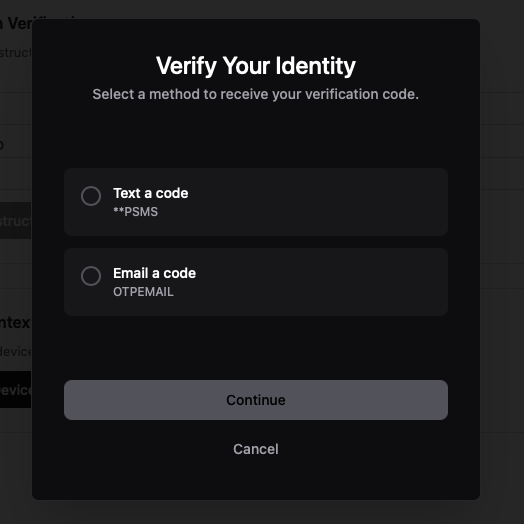 1Select verification method
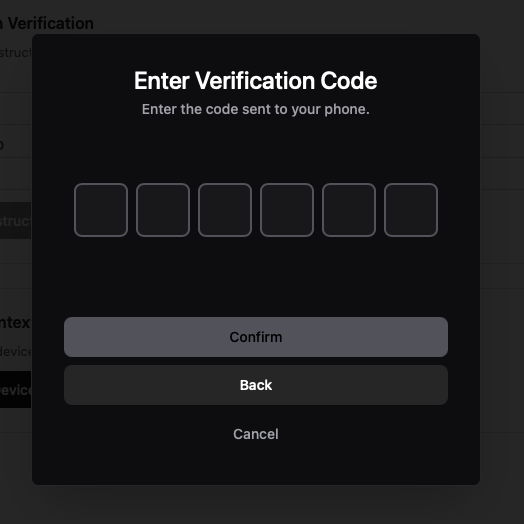 2Enter OTP code
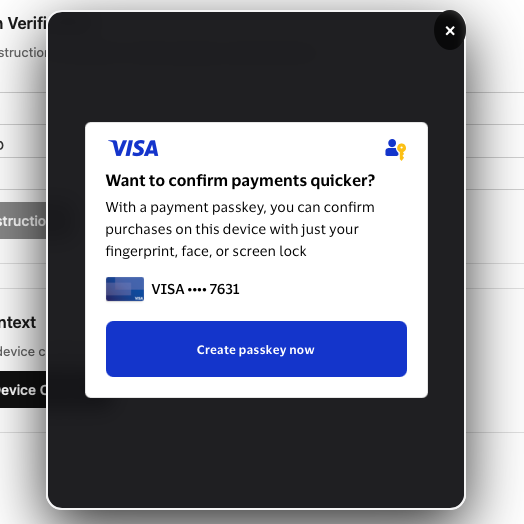 3Create passkey prompt
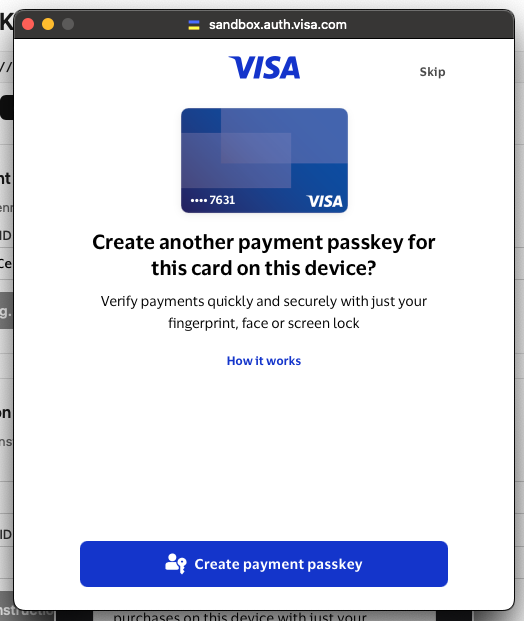 4Create payment passkey
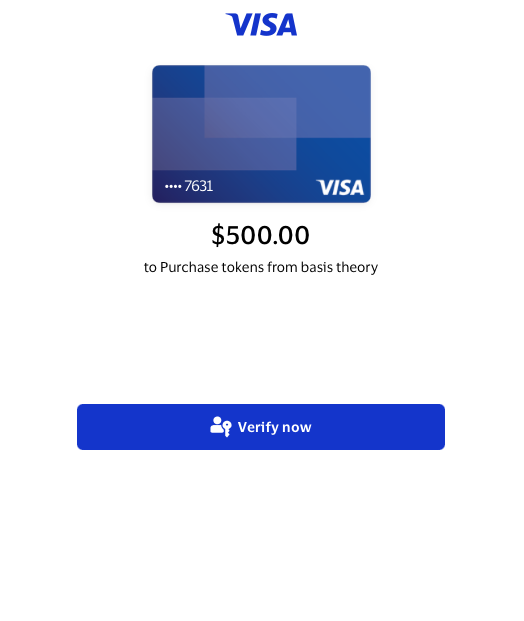 5Approve purchase
Mastercard uses a separate flow. The SDK opens Mastercard's hosted page in a popup for enrollment and instruction verification, then asks Basis Theory to confirm the result server to server. It does not render the Visa OTP or passkey sequence shown above.
Migrating to Agentic Payments
Agentic Payments uses a new resource model. Existing Enrollments and Instructions cannot be converted into Payment Methods or Allowances, and their IDs are not accepted by the new endpoints. Every Payment Method, Allowance, and Payment Credential is created through the Agentic Payments API with a new pm_, alw_, or cred_ ID.
A Basis Theory card token is a Vault resource rather than an Agentic Commerce resource. If the token remains available in the tenant, it can be the source for a new Payment Method. No Agentic state moves with it: enrollment status, provider state, verification results, instructions, and credentials stay with the deprecated integration.
| Deprecated Integration | Agentic Payments | What Changes |
|---|---|---|
Agent (agt_) | No required replacement | An Agent no longer owns the payment resources. An existing Agent ID can be supplied as optional agent_id attribution, but it does not carry resources forward or grant API access. |
Enrollment (enr_) | Payment Method (pm_) | Create a new Payment Method from the underlying card token. Creation provisions every supported rail, so inspect the returned rails instead of carrying forward the Enrollment status or verification result. |
| Enrollment verification | No direct replacement | Payment Method rails are provisioned without an Enrollment verification step. Customer verification happens later for each Allowance rail that requires it. |
Instruction (ins_) | Allowance (alw_) | Create a new Allowance against the Payment Method, scoped to a merchant or left open. A merchant set at creation cannot be changed. The deprecated recurring field has no equivalent. |
| Credentials response | Payment Credential (cred_) | Mint a new credential from an Allowance by selecting a returned rail, provider, and credential format. The spendable value is returned once, and minting consumes the requested amount from the Allowance. |
| Transaction confirmation | No equivalent | Track authorization and settlement outcomes through the merchant or payment processor. Agentic Payments does not observe what happens after it mints the credential. |
Cut Over Your Application
You can move new activity to Agentic Payments while the deprecated integration continues handling its existing resources:
- Configure the applications and permissions described in Agentic Payments Implementation. The deprecated permissions and React Agentic SDK methods do not apply to the new endpoints. Use the Web Agentic SDK for browser verification.
- Create a new Payment Method from the underlying card token, store its new ID, and inspect its rails before continuing.
- Create a new Allowance for the customer-approved merchant, amount, and expiration. If the selected rail returns
pending_verification, complete its Allowance verification flow. - Mint a new Payment Credential for the checkout. Capture the credential value from the create response and account for the Allowance being spent when the credential is minted, even if the purchase does not complete.
- Continue using the deprecated endpoints for existing Agents, Enrollments, and Instructions until your application no longer needs them. Do not send their IDs to Agentic Payments endpoints.
The Agentic Payments Implementation guide covers the complete request sequence, including rail handling, verification, credential formats, idempotency, and failure recovery.
Core Concepts
| Concept | What It Is | Analogy |
|---|---|---|
| Enrollment | A card registered with the card network for AI agent use. Created from a BT card token. | Like adding a card to Apple Pay™ — the card is "enrolled" so it can be used without exposing the real number. |
| Verification | Cardholder proves they approve the enrollment. Visa uses SMS/email OTP plus passkey creation; Mastercard uses a hosted popup instead. | Like the OTP you get when adding a card to a digital wallet — proves you own the card. |
| Agent | An AI entity that can use enrolled cards to make purchases. Has a name and a list of enrollments it can access. | Like giving a personal assistant your credit card — but with spending rules attached. |
| Instruction | A purchase intent with spending rules (max amount, currency, expiry). Must reference an active enrollment. | Like saying "you can spend up to $500 on electronics, but only until Friday." |
| Credentials | A one-time-use tokenized card credential (number, expiry, CVC) generated from an approved instruction. Used at merchant checkout. | Like a tokenized representation of the original card that works once and expires. The agent uses this at checkout. |
How It Works
- Collect Card Data — securely collect and tokenize card data using Basis Theory Elements (frontend).
- Create an Agent — register the AI agent that will make purchases (backend).
- Enroll a Card — link a Basis Theory card token to the agent via a network provider (backend).
- Verify Enrollment — the consumer confirms ownership of the card (frontend).
- Create an Instruction — set spending rules for a specific purchase (backend).
- Verify Instruction — the consumer approves the purchase (frontend).
- Retrieve Credentials — the agent receives tokenized card credentials to complete checkout (backend).
- Manage Enrolled Cards — consumers can remove enrolled cards from your application (backend).
400 VERIFICATION_STATE_INVALID. The React Agentic SDK branches on the provider and drives the correct flow.Prerequisites
Basis Theory Account
You need a Basis Theory account to store card data and interact with the Agentic Commerce API. Sign up for free if you do not have one.
Agentic Commerce Access
Enable Agentic Commerce on your tenant by requesting access to the Agentic Commerce quota in the Basis Theory Portal under Settings → Quotas. For sandbox testing, see the deprecated API test cards.
Browser and Device Requirements
Visa enrollment and instruction verification require FIDO2/WebAuthn support on the consumer's device and browser. Mastercard uses its hosted popup and does not run the Visa passkey ceremony. If a Visa consumer's environment does not support WebAuthn, the passkey step does not complete and verification stalls rather than returning a specific error code — there is no WEBAUTHN_NOT_SUPPORTED error. Capture the BT-TRACE-ID response header for support.
If a consumer encounters this error, advise them to:
- Use a modern browser (Chrome, Safari, Firefox, Edge) on a device that supports biometrics or a security key
- Update their browser and operating system to the latest version
- Try a different device if their current one does not support WebAuthn
Public Application
You will need a Public Application to authenticate requests. Click here to create one using the Basis Theory Customer Portal.
This will create an application with the following Access Controls:
- Permissions:
token:create,enrollment:verify,agent:instruction:verify
key from the created Public Application as it will be used later in this guide.This application is used in the frontend for collecting card data and for the consumer verification flows (enrollment and instruction verification).
Private Application
You will need a Private Application to allow your backend to call Basis Theory APIs. Click here to create one using the Basis Theory Customer Portal.
This will create an application with the following Access Controls:
- Permissions:
enrollment:create,enrollment:get,enrollment:delete,agent:create,agent:get,agent:update,agent:delete,agent:instruction:create,agent:instruction:get,agent:instruction:update,agent:instruction:delete,agent:instruction:credentials
key from the created Private Application as it will be used later in this guide.This application is used in the backend for managing agents, enrollments, instructions, and retrieving credentials.
1. Collecting Card Data with Elements
Use Basis Theory Elements to securely collect and tokenize card data without your systems touching sensitive information.
Configure Elements SDK
Basis Theory Elements are available for the following platforms:
Add Card Elements to Your Page
- JavaScript
- React
<div id="cardNumber"></div>
<div style="display: flex;">
  <div id="cardExpirationDate" style="width: 100%;"></div>
  <div id="cardVerificationCode" style="width: 100%;"></div>
</div>
<button id="submit">Submit</button>
import { basistheory } from '@basis-theory/web-elements';

let bt;
let cardNumberElement;
let cardExpirationDateElement;
let cardVerificationCodeElement;

async function init() {
  bt = await basistheory('<PUBLIC_API_KEY>');

  cardNumberElement = bt.createElement('cardNumber', {
    targetId: 'myCardNumber'
  });
  cardExpirationDateElement = bt.createElement('cardExpirationDate', {
    targetId: 'myCardExpiration'
  });
  cardVerificationCodeElement = bt.createElement('cardVerificationCode', {
    targetId: 'myCardVerification'
  });

  await Promise.all([
    cardNumberElement.mount('#cardNumber'),
    cardExpirationDateElement.mount('#cardExpirationDate'),
    cardVerificationCodeElement.mount('#cardVerificationCode'),
  ]);

  cardNumberElement.on('change', ({ cardBrand }) => {
    cardVerificationCodeElement.update({ cardBrand });
  });

  document.getElementById("submit").addEventListener("click", submit);
}

async function submit() {
  try {
    const token = await bt.tokens.create({
      type: 'card',
      data: {
        number: cardNumberElement,
        expiration_month: cardExpirationDateElement.month(),
        expiration_year: cardExpirationDateElement.year(),
        cvc: cardVerificationCodeElement,
      }
    });
    console.log('Token created:', token.id);
    // Send token.id to your backend for enrollment
  } catch (error) {
    console.error(error);
  }
}

init();
import React, { useRef, useState } from 'react';
import {
  BasisTheoryProvider,
  CardNumberElement,
  CardExpirationDateElement,
  CardVerificationCodeElement,
  useBasisTheory,
} from '@basis-theory/react-elements';

export default function App() {
  const { bt } = useBasisTheory('<PUBLIC_API_KEY>', { environment: 'test' });
  const cardNumberRef = useRef(null);
  const cardExpirationRef = useRef(null);
  const cardVerificationRef = useRef(null);
  const [cardBrand, setCardBrand] = useState();

  const submit = async () => {
    try {
      const token = await bt?.tokens.create({
        type: 'card',
        data: {
          number: cardNumberRef.current,
          expiration_month: cardExpirationRef.current.month(),
          expiration_year: cardExpirationRef.current.year(),
          cvc: cardVerificationRef.current,
        }
      });
      console.log('Token created:', token.id);
      // Send token.id to your backend for enrollment
    } catch (error) {
      console.error(error);
    }
  };

  return (
    <BasisTheoryProvider bt={bt}>
      <CardNumberElement
        id="myCardNumber"
        ref={cardNumberRef}
        onChange={({ cardBrand }) => setCardBrand(cardBrand)}
      />
      <div style={{ display: 'flex' }}>
        <div style={{ width: "100%" }}>
          <CardExpirationDateElement
            id="myCardExpiration"
            ref={cardExpirationRef}
          />
        </div>
        <div style={{ width: "100%" }}>
          <CardVerificationCodeElement
            id="myCardVerification"
            ref={cardVerificationRef}
            cardBrand={cardBrand}
          />
        </div>
      </div>
      <button onClick={submit}>Submit</button>
    </BasisTheoryProvider>
  );
}
2. Create an Agent
Register the AI agent that will make purchases. Each agent represents a distinct bot or assistant in your system.
curl -X POST https://api.basistheory.com/agentic/agents \
  -H 'BT-API-KEY: <BT_API_KEY>' \
  -H 'Content-Type: application/json' \
  -d '{
    "name": "Shopping Assistant"
  }'
{
  "id": "agt_fukICjsY2xzRCECiTCbKM",
  "name": "Shopping Assistant",
  "status": "active",
  "created_at": "2026-01-15T10:30:00Z"
}
Save the agent id — you will use it in all subsequent API calls.
See the Agents API Reference for all available operations.
3. Enroll a Card
Enroll a Basis Theory card token with a network provider. The card brand is auto-detected, and the appropriate network (Visa or Mastercard) handles the enrollment.
curl -X POST https://api.basistheory.com/agentic/enrollments \
  -H 'BT-API-KEY: <BT_API_KEY>' \
  -H 'Content-Type: application/json' \
  -d '{
    "token_id": "<TOKEN_ID>",
    "agent_id": "<AGENT_ID>",
    "consumer": {
      "email": "consumer@example.com"
    }
  }'
{
  "id": "enr_wNe75VKdzvojI9iD5fJxr",
  "provider": "visa",
  "status": "pending_verification",
  "card": {
    "brand": "visa",
    "bin": "424032",
    "last4": "0359",
    "expiration_month": 11,
    "expiration_year": 2029,
    "display": {
      "art_url": "https://assets.vims.visa.com/vims/cardart/abc123",
      "background_color": "1A1F71",
      "foreground_color": "FFFFFF",
      "description": "Visa Signature",
      "issuer_name": "Chase"
    }
  },
  "created_at": "2026-01-15T10:31:00Z"
}
The enrollment starts in pending_verification status and moves to active after the consumer completes verification.
See the Enrollments API Reference for all available operations.
4. Verify Enrollment
The consumer must verify they own the card. Use the @basis-theory/react-agentic SDK to handle the provider-specific verification flow in your frontend: Visa presents an OTP challenge followed by passkey creation, while Mastercard opens its hosted authentication popup.
Install the SDK:
npm install @basis-theory/react-agentic
Wrap your application with the BtAiProvider and use the useAgentic hook to call verifyEnrollment:
import { BtAiProvider } from '@basis-theory/react-agentic';

function App() {
  return (
    <BtAiProvider apiKey="<PUBLIC_API_KEY>" environment="production">
      <VerifyEnrollment enrollmentId="enr_wNe75VKdzvojI9iD5fJxr" />
    </BtAiProvider>
  );
}
import { useAgentic } from '@basis-theory/react-agentic';

function VerifyEnrollment({ enrollmentId }) {
  const { verifyEnrollment } = useAgentic();

  const handleVerify = async () => {
    try {
      const result = await verifyEnrollment(enrollmentId);
      console.log('Enrollment verified:', result);
      // Enrollment status is now "active"
    } catch (error) {
      // Store error details for debugging and support
      console.error('Verification failed:', error.message);
      if (error.traceId) {
        console.error('Trace ID:', error.traceId);   // BT-TRACE-ID for support
        console.error('Error code:', error.code);     // e.g., "PROVIDER_VERIFICATION_FAILED"
        console.error('Provider correlation:', error.debug?.provider_correlation); // Visa Correlation ID
      }
    }
  };

  return (
    <button onClick={handleVerify}>
      Verify Card Enrollment
    </button>
  );
}
The BtAiProvider must wrap any component that uses the useAgentic hook. It authenticates requests using your Public API key. Set environment to "test" when using a test tenant; it selects the test API host. Mock providers are chosen server-side from the API key, not by this prop. See the React Agentic SDK reference for all provider props.
verifyEnrollment reads the enrollment provider and drives the corresponding flow:
- Visa — renders OTP method selection and entry, then creates a passkey on the consumer's device.
- Mastercard — opens Mastercard's hosted authentication page in a popup and completes after the callback is confirmed.
After successful verification, the enrollment status changes from pending_verification to active.
Modal Branding
The verification modal displays "Basis Theory" branding by default. You can customize the visual appearance of the modal — including colors, typography, and borders — using the theme prop on BtAiProvider. See Theming for the full list of design tokens.
5. Create an Instruction
Once the enrollment is active, create an instruction that defines the spending rules for a specific purchase. Instructions control how much the agent can spend and when the authorization expires.
description is always required. For Visa, it appears in the passkey verification prompt shown to the consumer, unless a merchant name is supplied, in which case the merchant name is used instead. Write it as a human-readable purchase intent (e.g., "plan and book a trip to Europe"). The word "to" is static in Visa's prompt and cannot be changed, so structure your description accordingly.
curl -X POST https://api.basistheory.com/agentic/agents/agt_fukICjsY2xzRCECiTCbKM/instructions \
  -H 'BT-API-KEY: <BT_API_KEY>' \
  -H 'Content-Type: application/json' \
  -d '{
    "enrollment_id": "enr_wNe75VKdzvojI9iD5fJxr",
    "amount": {
      "value": "500.00",
      "currency": "USD"
    },
    "description": "plan and book a trip to Europe",
    "expires_at": "2030-02-20T00:00:00Z"
  }'
{
  "id": "ins_luPDv2xm3Yb8RjFJz9oTC",
  "enrollment_id": "enr_wNe75VKdzvojI9iD5fJxr",
  "status": "pending_verification",
  "amount": {
    "value": "500.00",
    "currency": "USD"
  },
  "expires_at": "2030-02-20T00:00:00Z",
  "created_at": "2026-01-15T10:35:00Z"
}
Instruction Statuses
| Status | Description |
|---|---|
pending | Awaiting provider approval |
pending_verification | Provider approved; awaiting consumer verification |
approved | Consumer verified; credentials can be retrieved |
cancelled | Cancelled by the card network, for example when the underlying token is suspended |
Expiry is evaluated per request rather than stored: an instruction past its expires_at still reports approved, and credential retrieval returns 400 INSTRUCTION_EXPIRED.
See the Instructions API Reference for all available operations.
6. Verify Instruction
The consumer must approve each instruction. Use the verifyInstruction method from the useAgentic hook. It performs Visa passkey authentication for Visa instructions and opens Mastercard's hosted popup for Mastercard instructions. This component must also be wrapped by the BtAiProvider (see Step 4).
import { useAgentic } from '@basis-theory/react-agentic';

function VerifyInstruction({ agentId, instructionId }) {
  const { verifyInstruction } = useAgentic();

  const handleVerify = async () => {
    try {
      const result = await verifyInstruction(agentId, instructionId);
      console.log('Instruction approved:', result);
      // Instruction status is now "approved"
    } catch (error) {
      console.error('Verification failed:', error.message);
      if (error.traceId) {
        console.error('Trace ID:', error.traceId);
        console.error('Error code:', error.code);
        console.error('Provider correlation:', error.debug?.provider_correlation);
      }
    }
  };

  return (
    <button onClick={handleVerify}>
      Approve Purchase
    </button>
  );
}
verifyInstruction renders a modal that prompts a Visa consumer to authenticate with their passkey or a Mastercard consumer to continue in the hosted popup. After successful verification, the instruction status changes from pending_verification to approved.
7. Retrieve Credentials
Once the instruction is approved, retrieve tokenized card credentials from your backend. The response contains a card number, expiry, and CVC that the agent can use at checkout.
curl -X POST https://api.basistheory.com/agentic/agents/agt_fukICjsY2xzRCECiTCbKM/instructions/ins_luPDv2xm3Yb8RjFJz9oTC/credentials \
  -H 'BT-API-KEY: <BT_API_KEY>' \
  -H 'Content-Type: application/json' \
  -d '{
    "merchant": {
      "name": "Amazon",
      "url": "https://www.amazon.com",
      "country_code": "US"
    },
    "products": [
      {
        "name": "Widget",
        "price": 99.99,
        "quantity": 2
      }
    ],
    "shipping_address": {
      "line1": "123 Main St",
      "city": "San Francisco",
      "state": "CA",
      "postal_code": "94105",
      "country_code": "US"
    }
  }'
{
  "card": {
    "number": "4111111111111111",
    "expiration_month": "12",
    "expiration_year": "2030",
    "cvc": "123"
  },
  "expires_at": "2030-02-20T00:00:00Z"
}
The agent can now use these credentials to complete a purchase at the specified merchant.
See the Credentials API Reference for request and response details.
8. Manage Enrolled Cards
Consumers must be able to remove enrolled cards from your application. Use the DELETE /agentic/enrollments/{id} endpoint to remove an enrollment when a consumer requests it.
curl -X DELETE https://api.basistheory.com/agentic/enrollments/enr_wNe75VKdzvojI9iD5fJxr \
  -H 'BT-API-KEY: <BT_API_KEY>'
A successful deletion returns a 204 No Content response. Its instructions keep whatever status they had — deletion does not touch them — but credential retrieval against them then fails with 403 ENROLLMENT_DELETED. Do not poll instruction status to detect this.
See the Enrollments API Reference for details.
Going Live
Before launching in production, complete every item below.
Your UI
- Display issuer card art. Render the
card.display.art_urlfrom the enrollment response when showing enrolled cards. Showing only the network logo is not sufficient — display the actual issuer card art in your card management screens. Use thebackground_colorandforeground_colorfields to render the card accurately. - Show Terms & Privacy Policy. Present links to your Terms of Service and Privacy Policy either on first wallet launch or every time a card is added. Cardholders must be explicitly aware of what the wallet will do with their card data before enrolling. For Visa enrollments, your Privacy Policy must disclose that card and identity data is shared with Visa for AI agent purchases. This cannot be buried in fine print.
- Provide a "Remove Card" option. Consumers must be able to unenroll a card at any time. See Step 8.
- Build a notification flow for payment approval. When an agent creates an instruction, your application must notify the consumer that approval is needed. Common pattern: send a link (via chat, SMS, or email) to a page that calls
verifyInstruction. Basis Theory does not send notifications — your app manages the delivery. - Prevent duplicate enrollments. Before creating a new enrollment, check whether the card is already enrolled for this consumer by comparing the
token.fingerprintand the consumer's user ID against existing enrollments. The API does not currently prevent duplicates, so this check must be implemented on your side.
Error Handling
- Handle partial enrollment failures. When enrollment partially fails (for example, the card registers but provider provisioning fails), the API still returns the enrollment object with card art and display data preserved. Show the card with its art even if it cannot be used for purchases yet. Do not hide the card or show a generic error. Nothing retries on its own — recovery is an explicit
POST /enrollments/{id}/retry, and only afailedenrollment accepts it. - Log Visa Correlation IDs. On errors, capture
error.debug?.provider_correlationalongside the BT trace ID. Both are required for Visa support escalations. - Store
BT-TRACE-IDon all errors. All API responses include this header. On errors, the response body may also containdebug.provider_correlation. Log both values — they are essential for troubleshooting with Basis Theory support.
Visa Review
- Record demo videos. Visa Legal requires two videos of your implementation:
- Add Card Flow — show push notifications, verification (OTP), and passkey creation
- Payment Instruction — show the agent interaction and passkey authentication for approving a purchase
- Confirm KYC data collection. At minimum, collect the consumer's email address before enrollment.
FAQ
What card issuers are not supported?
Visa is currently live in the US market supporting consumer cards for most banks. Some known exceptions are JP Morgan Chase branded cards and Commercial cards (e.g., Ramp or Business cards). Mastercard is currently live in the US market.
Which card brands are supported?
Visa cards are supported through Visa Intelligent Commerce, and Mastercard cards through Mastercard Agent Pay. The card brand is auto-detected during enrollment based on the Basis Theory token data.
Can I also process my own payments with the cards collected?
Yes. To process payments with your tokenized card data, refer to these guides:
- Charge a Card — process payments with various processors including Stripe, Adyen, and others
- Verify a Card — validate cards by performing $0 authorizations before processing actual payments
Can I integrate with other agentic platforms with cards collected?
Once you have a Basis Theory Token, you can use it with any payment processor or agentic payments partner. The Basis Theory platform provides flexible options for integrating without being locked into any specific provider.
- Proxy API Reference — use the proxy to integrate with any HTTP-based payment service
- Invoke Proxy — invoke proxy requests with your tokens
What happens if the consumer does not complete verification?
The enrollment remains in pending_verification status. You can retry verification or delete the enrollment and create a new one. Instructions cannot be created against a pending_verification enrollment.
How long are credentials valid?
Credentials can be retrieved only until the instruction's expires_at. Expiry is evaluated when you request credentials, so the stored instruction still reports approved; the credential request returns 400 INSTRUCTION_EXPIRED.
What countries and card types are supported?
The supported market is currently the US, with eligibility determined separately by each network:
- Visa — US consumer cards from Bank of America, Wells Fargo, and Capital One are confirmed. JP Morgan Chase-branded, prepaid, Small Business, Commercial, and non-US cards are rejected at enrollment with
400 CARD_NOT_ELIGIBLEwhen the card's BIN data identifies them. - Mastercard — US cards are supported through Mastercard Agent Pay. Mastercard does not use the Visa-specific local eligibility rules above; issuer and card-product availability follows Mastercard's program.
If enrollment fails, check the debug.provider_correlation value in the error response and contact support@basistheory.com for current market availability.
Can I see spending activity or transaction history for a credential?
No. Once credentials are retrieved and used at checkout, there is no API to view transaction history or spending activity for that credential. Authorization results are handled by the merchant's payment processor, not Basis Theory.
What consumer information do I need to collect for KYC?
The enrollment API requires the consumer's email address. This must be collected before creating an enrollment.
How do I handle consumer notification for payment approval?
When an agent creates an instruction, your application is responsible for notifying the consumer that approval is needed. A common pattern is to send the consumer a link (via chat, SMS, or email) to a web page that calls verifyInstruction. The consumer opens the link and completes the provider's ceremony — a Visa passkey or Mastercard hosted popup — and the instruction moves to approved status. Basis Theory does not send notifications directly; your application manages the delivery mechanism.
What happens if enrollment partially fails?
The enrollment is still saved with card art and display data preserved. Your UI should show the card even if provider provisioning failed — do not hide it or show a generic error. Retrying is an explicit call to POST /enrollments/{id}/retry; nothing re-attempts provisioning on its own.
Can I use tokenized credentials for recurring or subscription payments?
Contact support@basistheory.com for current recurring transaction support.
What happens when a consumer verifies from a different device?
For Visa, the SDK triggers full ID&V and passkey creation on a new device by default. Configure the onNewDevice prop on BtAiProvider to control this behavior — set it to "decline" to ask the consumer to return to the original device instead. Mastercard continues through its hosted popup. See BtAiProvider props.
What KYC/privacy disclosures do I need in my app?
Present your Terms of Service and Privacy Policy either on first wallet launch or every time a card is added. Your Privacy Policy must disclose that card and identity data is shared with Visa for the purpose of enabling AI agent purchases. This is a Visa requirement — it cannot be buried in fine print.