Node.js Runtime Images
Node.js runtime images represent a major evolution in how you run custom code within Basis Theory. Built with developer experience and security in mind, they give you full control over dependencies, compute resources, and runtime configuration.
Supported Images
| Runtime image | Node.js version |
|---|---|
node22 | 22 |
node24 | 24 |
All listed images support the same runtime options, provisioning states, code contracts, and security controls documented on this page. The examples use node24; select another supported image by changing only runtime.image.
Why Use a Node.js Runtime Image?
-
Manage your own dependencies: Install any npm package directly in your reactor. No more requesting packages or working around version limitations.
-
Modern Node.js runtimes: Choose an actively supported Node.js version with modern JavaScript features and active security updates.
-
Configurable resources: Configure timeout and resources to match your workload requirements.
-
Warm concurrency: Keep your functions warm and customize how many instances stay ready to handle requests.
-
Simplified code contract: A streamlined request/response pattern with enhanced logging support and full HTTP response control.
-
Fine-grained permissions: Specify exactly which Basis Theory permissions your code needs without requiring a separate Application.
Getting Started
To create a Reactor or Proxy code transform, set runtime.image to a supported image. For API details, see:
For Proxy code contracts, see the request transform contract and response transform contract.
Reactors using a Node.js runtime image can run synchronously or asynchronously. Proxy transforms always run synchronously.
Runtime Options
Use the runtime object to configure runtime logs, dependencies, resolutions, timeout, resources, warm concurrency, and permissions. Reactors can also be configured for asynchronous execution.
Runtime Image
Set runtime.image to one of the supported images to select the Node.js version that runs your code.
Runtime Logs
Set optional runtime.logs.enabled to true to capture configurable runtime-log records. Configurable runtime-log capture is disabled by default. Set optional runtime.logs.level to debug, info, warn, or error; the default is info.
See Runtime Logs for application and lifecycle records, asynchronous reprovisioning behavior, access methods, ordering, sanitization, and capture limitations.
Dependencies
Specify npm packages to install in your runtime environment via runtime.dependencies. Packages are installed at build time when the resource is created or updated.
{
  "runtime": {
    "image": "node24",
    "dependencies": {
      "stripe": "22.4.0",
      "lodash": "4.18.1",
      "axios": "1.19.0"
    }
  }
}
Pinned versions are required. Do not use version ranges like "^22.4.0" or "~22.4.0". Specify exact versions (e.g., "22.4.0").
Vulnerability Scanning
Dependencies for Node.js runtime images are scanned during deployment, and deployed runtime artifacts are scanned continuously after deployment.
If HIGH or CRITICAL vulnerabilities are detected during deployment, provisioning fails until dependencies are remediated.
See Runtime Vulnerability Scanning for scan behavior, failure details, notification cadence, and webhook events.
It is still recommended to run dependency scans in your own CI process (for example npm audit and Trivy) before deploying.
Resolutions
Use runtime.resolutions to override versions of dependencies installed indirectly through other packages. Overrides are applied at build time when the resource is created or updated.
{
  "runtime": {
    "image": "node24",
    "dependencies": {
      "maskdata": "1.3.4"
    },
    "resolutions": {
      "lodash": "4.18.1"
    }
  }
}
Pinned versions are required. Do not use version ranges like "^4.18.1" or "~4.18.1". Specify exact versions (e.g., "4.18.1").
Use runtime.resolutions when a dependency in runtime.dependencies installs a transitive dependency version you need to replace, such as for a security patch or compatibility fix.
Timeout
Maximum execution time for your code in seconds. The supported range depends on how the runtime is used.
| Execution mode | Supported range | Default |
|---|---|---|
| Synchronous Reactor or Proxy transform | 10 to 30 seconds | 10 seconds |
| Asynchronous Reactor | 10 to 900 seconds | 10 seconds |
Resources
Control the compute resources allocated to your runtime.
| Value | Memory (MB) | When to use |
|---|---|---|
standard | 256 | Most workloads, typical operations, standard processing needs |
large | 1024 | Operations that need more resources than standard, heavier workloads |
xlarge | 2048 | Operations requiring maximum resources, mainly for resource-intensive workloads |
CPU capacity scales proportionally with memory. Larger resource sizes receive proportionally more CPU capacity.
Warm Concurrency
runtime.warm_concurrency controls how many warm instances of your reactor are kept ready for your tenant. It defaults to 0 for all tenants.
Warm instances are pre-initialized instances that can start handling requests as soon as they arrive, which helps reduce latency for workloads that are sensitive to startup time. Most workloads don't need to configure them. After an invocation, the instance typically stays warm for about 5 minutes, so traffic that arrives at least every few minutes generally runs warm without any configuration. Each instance handles one request at a time, so a request cold starts only when no idle warm instance is available. A burst of concurrent requests above the number of instances already warm cold starts additional instances. Configured warm instances only cover the number you configure.
Configure warm instances when you have a specific need, such as strict latency requirements on sparse traffic, heavy initialization that doesn't fit within the invocation timeout, or predictable bursts of concurrent requests. Configured warm instances are a paid capability. Request them in Settings > Quotas in the Portal when your workload needs them, and include the traffic pattern and the latency you need so we can size the quota.
Cold Starts
A cold start happens when a request arrives and no warm instance is available to handle it. In that case, Basis Theory initializes a new instance before running your reactor.
If a warm instance is available, the request executes immediately. If all warm instances are busy (or none are configured), the request waits for a new instance to initialize.
What to expect:
- A cold start typically adds about 1 second for a reactor with small dependencies. Cold start duration grows with your reactor's dependencies and code size, so larger dependencies take longer.
- The first invocation after a reactor is provisioned or updated is slower than a typical cold start. The agent runtime guides include measured first-invocation times for heavier dependencies.
- Occasional cold starts are normal on low or irregular traffic. Reach for
warm_concurrencyonly when they cause a problem you can measure.
If a Reactor or Proxy transform is not invoked for multiple weeks, the runtime may need to reactivate. A 503 Service Unavailable response with a message indicating that the Reactor or Proxy request transform is reactivating means it should become available shortly. See Reactor Error Codes and Proxy Errors for response details.
Permissions
Grant Basis Theory permissions to your runtime via runtime.permissions. These permissions determine what operations the code can perform when it executes. See the permissions reference for permissions that can also be granted to Applications.
{
  "runtime": {
    "image": "node24",
    "permissions": ["token:create"]
  }
}
Common runtime permission combinations include:
| Runtime permissions | Capability |
|---|---|
token:create | Create Tokens |
token:read | Retrieve masked Token data |
token:read and token:reveal | Retrieve plaintext Token data |
token:reveal is currently available only to Node.js runtimes. It cannot be granted directly to an Application as a permission.
Sandbox Restrictions
Code using a Node.js runtime image, including the dependencies it loads, runs in a sandbox that blocks the following operations:
| Operation | Behavior |
|---|---|
Loading child_process, worker_threads, cluster, vm, inspector, repl, or dgram, with or without the node: prefix | Throws Access to module "<name>" is restricted. A CommonJS require("child_process") returns the module, but calling any of its functions throws the same error. |
Reading files outside /var/task (your code and dependencies) and /tmp | Throws File system read access to "<path>" is restricted. This includes fs.existsSync, which throws instead of returning false. |
Writing files outside /tmp | Throws File system write access to "<path>" is restricted. |
| Outbound requests over plain HTTP (port 80) | The connection times out. Call external services over HTTPS. |
Libraries that spawn processes, start worker threads, or inspect the host file system when they load do not work in a Node.js runtime. When your code or one of its dependencies attempts a restricted operation while Basis Theory loads your code, provisioning fails, the resource's state becomes failed, and the requested object describes the operation:
{
  "error_code": "restricted_operation",
  "error_message": "Your code or one of its dependencies attempted an operation that is not permitted.",
  "error_details": {
    "reason": "restricted_module",
    "module": "worker_threads"
  }
}
When a restricted operation runs during a Reactor invocation, the invocation fails with a 422 response whose error_details.error_instance is ReactorSandboxError.
States
Resources using a Node.js runtime image use a state machine to track provisioning and runtime status. Understanding these states helps you build integrations that handle asynchronous operations correctly.
| State | Description |
|---|---|
creating | Initial provisioning in progress |
active | Ready to invoke |
updating | Modification in progress |
failed | Provisioning or update failed |
outdated | Update failed, but previous version is still functional |
State Diagram
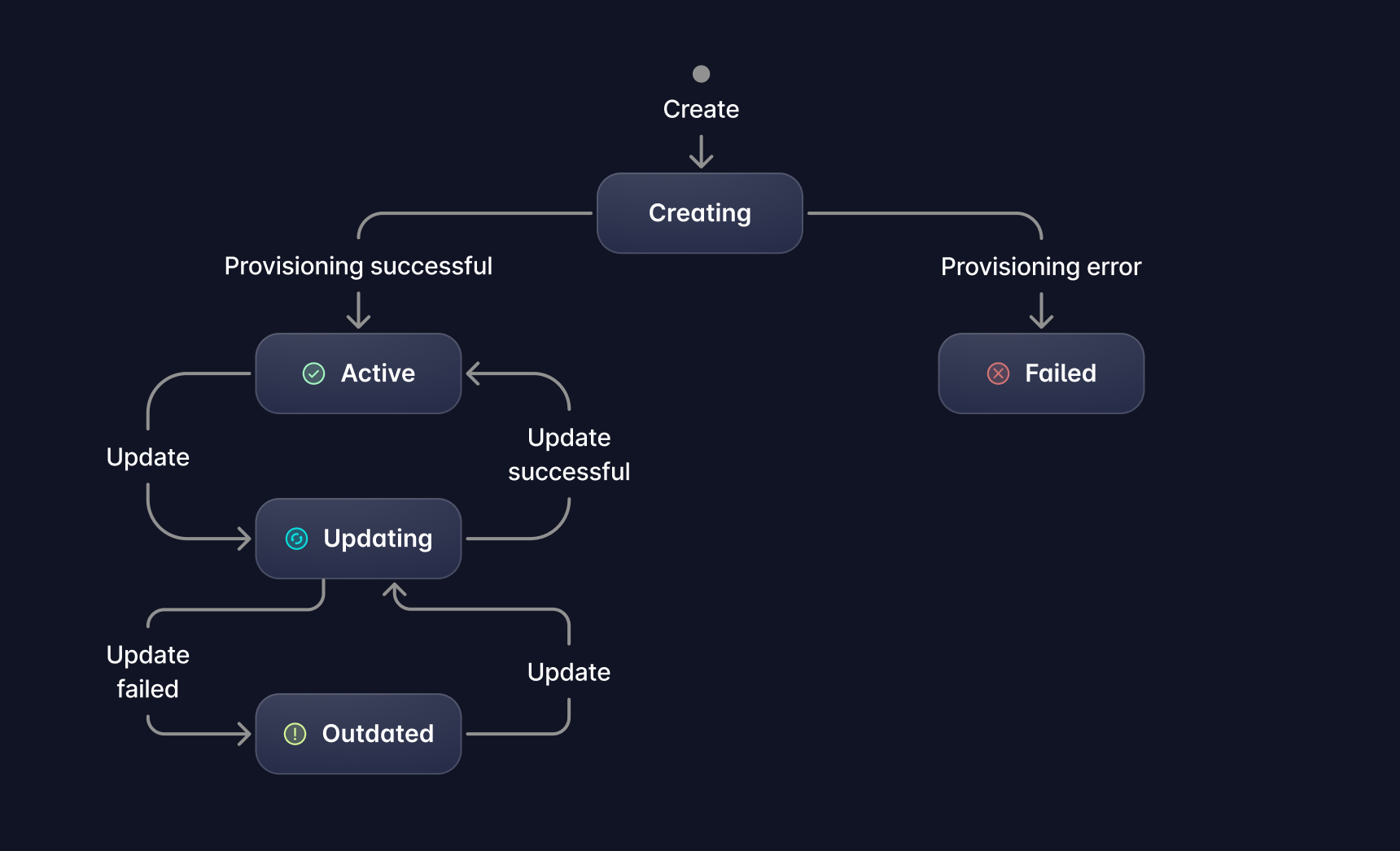
State Transitions
| Transition | Trigger |
|---|---|
| creating → active | Successful provisioning |
| creating → failed | Provisioning error (e.g., invalid dependencies, syntax error in code) |
| active → updating | Update initiated via PUT or PATCH |
| updating → active | Successful update |
| updating → outdated | Update failed (previous version remains active and can still be invoked) |
| outdated → updating | New update initiated via PUT or PATCH |
Operation Behavior
The following table shows which operations are allowed based on the current state of a Reactor or Proxy using a Node.js runtime image:
| State | Invoke | Update | Delete |
|---|---|---|---|
creating | ❌ | ❌ | ❌ |
active | ✅ | ✅ | ✅ |
updating | ✅* | ❌ | ❌ |
failed | ❌ | ✅ | ✅ |
outdated | ✅ | ✅ | ✅ |
* During an update, invocation uses the previous active configuration when one exists. A resource that has never completed provisioning remains unavailable. In outdated state, invocation executes the previous working version.
Asynchronous Reactors
See Asynchronous Reactors for the shared submit-and-retrieve workflow.
Set runtime.async to true to configure a Reactor using a Node.js runtime image for asynchronous execution. This option applies only to Reactors and is not supported for Proxy transforms.
{
  "runtime": {
    "image": "node24",
    "async": true,
    "timeout": 900
  }
}
Invoke an asynchronous Reactor through the asynchronous Reactor endpoint, then poll for its result.
Partial Results
During an asynchronous invocation using a Node.js runtime image, the Reactor handler receives asyncRecords. Call asyncRecords.write(recordId, value) to preserve intermediate results before the Reactor finishes:
module.exports = async function (event) {
  const { req, asyncRecords } = event;

  await asyncRecords.write("customer-myCustomerId1234", {
    customer_id: req.customer_id,
    status: "processed"
  });

  return {
    res: {
      body: { processed: true },
      statusCode: 200
    }
  };
};
Await each write so your Reactor can handle a failed record upload. Each invocation supports:
- Up to
25records. - Serialized values up to
256 KiBper record. - Record IDs from
1to64characters using letters, numbers, underscores, and hyphens. The first character must be a letter or number.
Record IDs must be unique within an invocation, and record values must be JSON-serializable. Use each record's id instead of depending on array order.
If the Reactor fails or times out after writing records, successfully written records remain available in the final result.
Migrating from node-bt
For the code, dependency, permission, testing, and rollout changes required to move an existing resource, see Migrate from node-bt.